About this article
An SSO-protected event portal is an enterprise event registration environment where access is controlled by the organization’s corporate identity provider (Okta, Azure AD, CyberArk, OneLogin, or similar) via standard protocols (SAML 2.0 or OpenID Connect). Employee data flows directly from the corporate directory into the registration process. No manual entry. No data quality issues.
- Locked-Field Registration: Directory-sourced employee attributes (name, email, department, role) pre-populate registration forms as non-editable fields. Organizers can still add custom event-specific fields. Very different from SSO as a simple login gate.
- Multi-Touchpoint Identity: SSO extends beyond registration to the organizer back-office, delegate-facing applications, and on-site check-in. Each channel runs as a separate application within the client’s identity provider.
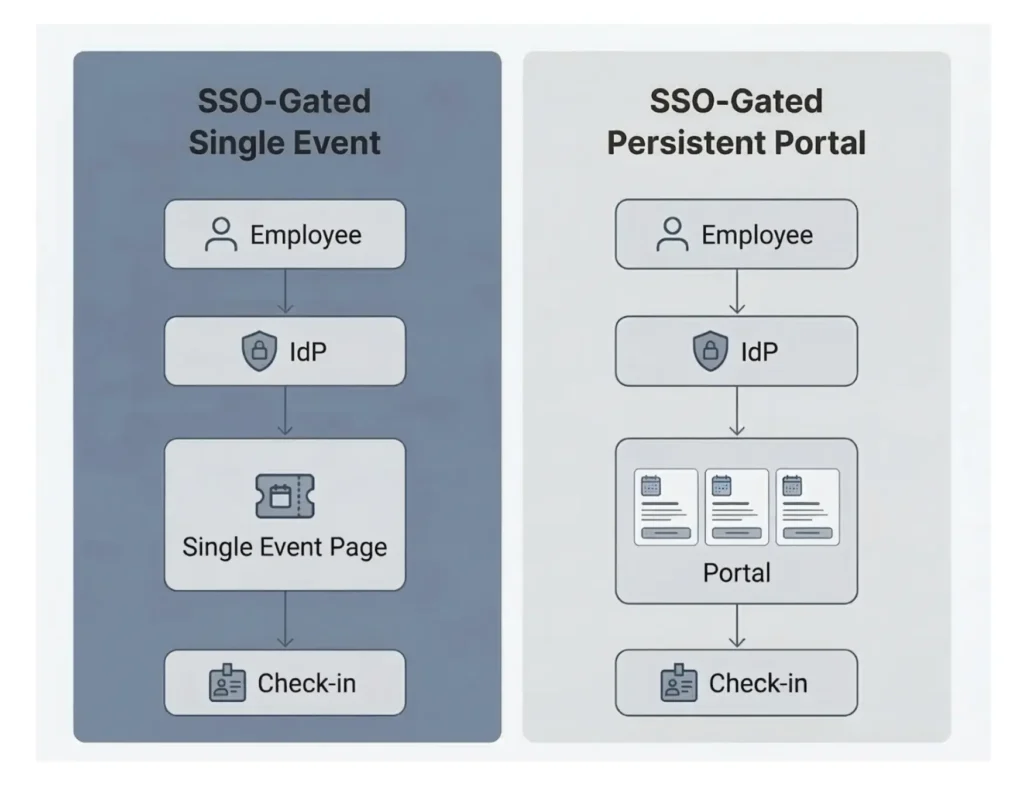
- Two Core Architectures: SSO-gated single event pages (annual summits, training programs, government events) and SSO-gated persistent portals (organizations with continuous internal event calendars). A hybrid model combines API-based event management with standalone SSO portals for flagship experiences.
- Proven Enterprise Deployments: Eventtia has deployed SSO-protected event environments for global brands including Tiffany & Co. and Nike, across Okta, Azure AD, CyberArk, OneLogin, and Google Workspace.
Covers architecture, implementation process, evaluation criteria, and practical limitations for enterprise buyers and IT stakeholders.
The Problem: Why Standard Event Platforms Fail for Enterprise
Most event management software is designed for one scenario: public registration. An open form, a confirmation email, a name on an attendee list. That works for marketing conferences and trade shows. It falls apart when enterprises need to manage internal events.
The requirements look completely different. A global company running an internal leadership summit or a regional training program needs registration restricted to verified employees. It needs the attendee’s identity, department, role, and location to flow automatically from the corporate directory, not from a self-reported form. It needs approval workflows tied to organizational hierarchy. And it needs all of that under its own brand, on its own domain.
Single Sign-On (SSO) is where this starts. Not as a nice-to-have security feature, but as the foundational architecture for how the entire event operates.
What is an SSO-Protected Event Portal?
An SSO-protected event portal is a corporate event registration system where access is restricted to authenticated employees through the organization’s identity provider (IdP), and attendee data is recovered directly from the corporate directory into the registration process. The identity provider (Okta, Azure AD, CyberArk, OneLogin, Google Workspace, or similar) connects to the event platform via standard authentication protocols: SAML 2.0 or OpenID Connect. These protocols are universal. Any identity provider that supports them can be integrated. Employees authenticate with their existing corporate credentials. Their identity data (name, email, department, location, role) arrives as claims within the authentication token. No manual data entry, no data integrity issues. Nobody outside the organization’s directory can access the portal.
Almost no event platform was designed this way from the ground up. Enterprise buyers who need this capability, from luxury brands and global sportswear companies to government agencies and public institutions, routinely evaluate dozens of vendors before finding a solution. The need is not industry-specific. It exists in any organization with a corporate directory and internal events that require verified attendance. Yet many conclude the market doesn’t offer what they need and consider building from scratch.
The solutions do exist. They require a platform with the right architecture: deep API infrastructure, flexible identity provider integration, and the ability to apply SSO across every touchpoint. Registration, event content, on-site check-in, access control. All of it.
Where do SSO event portals fit in the software market?
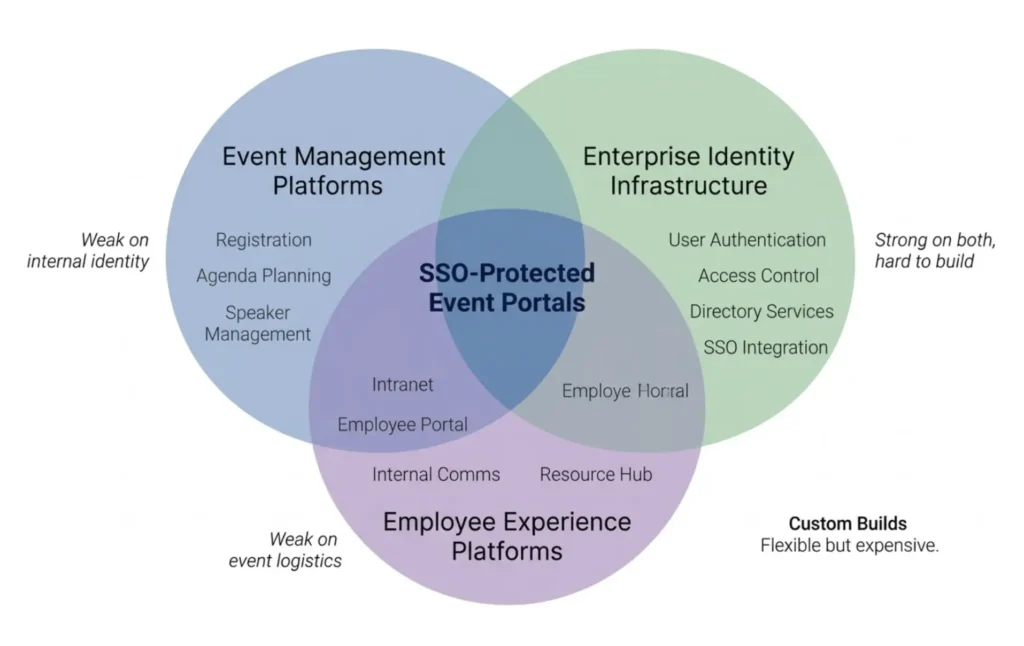
One reason enterprise buyers struggle to find SSO-protected event portals is that the category doesn’t have an obvious home. The need sits at the intersection of three software categories, and none of them fully addresses it.
Event management platforms (Cvent, Splash, Bizzabo) are built for marketing events, conferences, and external audiences. Some support SSO as a feature, but their architecture centers on public registration and attendee acquisition. Internal identity integration is an afterthought, not a foundation.
Employee experience platforms (Workvivo, LumApps, Poppulo, Viva Engage) connect to corporate directories natively. They handle internal communications, culture, and engagement. Events are one module among many, and the event logistics capabilities (sub-event registration, capacity management, check-in, access control) are typically limited.
Custom builds are what many enterprises default to. SSO authentication plus a registration form, built internally. This works for simple RSVP scenarios but becomes expensive and fragile when the organization needs real event management on top of it.
SSO-protected event portals fall into the gap between these three. They need the identity integration depth of an employee platform, the event logistics capabilities of an event management platform, and the flexibility of a custom build. No single existing category delivers all three. That’s why buyers evaluate dozens of vendors and often conclude that nothing fits. The solutions exist, but they’re found in platforms with infrastructure-level architecture rather than in any one product category.
Two Enterprise SSO Event Architectures
Not all SSO event implementations look the same. Through deploying these solutions for global enterprise clients, two distinct architectural patterns have emerged. The right choice depends on event frequency, the scope of the internal event program, and how deeply the event experience needs to live inside the company’s existing systems.
Pattern 1: SSO-Gated Single Event Page
Best for: Companies running one major internal event at a time. Annual conferences, leadership summits, global kickoffs, government internal events.
In this model, the event platform deploys a branded, SSO-protected event page under the company’s own domain. Employees access the page by authenticating through their corporate identity provider. Once authenticated, their employee data is recovered automatically and mapped to the registration process.
The page is not a persistent portal. It’s purpose-built for a single event and renewed for each subsequent one. But the SSO integration itself is persistent, meaning each new event inherits the same identity infrastructure without re-implementation.
How does directory data flow into registration?
When an employee authenticates via SSO, the identity provider returns a signed token (an ID token in OpenID Connect, or a SAML assertion in SAML 2.0) containing claims: structured data about the user. These claims typically include email, first name, last name, department, and role. The event platform reads these claims and maps them to the corresponding registration fields.
In most deployments, all the necessary employee data arrives within the token itself, configured by the client’s IT team when they set up the IdP application. Secondary API calls to directory services like Microsoft Graph are possible but not required in most cases. Most clients find it simpler and more secure to include the required attributes as claims directly in the token.
One non-negotiable requirement: the token must include the employee’s email address, which serves as the primary identifier in the event platform. That’s the single hard dependency. Everything else is flexible and configured per client.
What is the locked-field registration model?
Here’s the architectural detail that separates SSO-gated event registration from simple SSO login. When an employee authenticates, their identity data (name, email, department, role) is recovered from the corporate directory and pre-populated into the registration form. These fields are locked. Non-editable. The participant cannot alter reference data during registration.
At the same time, event organizers retain full flexibility to add custom fields specific to each event: session preferences, dietary requirements, travel logistics, or any other information the directory doesn’t contain. Participants fill those out normally. You get the integrity of directory-sourced identity data combined with the flexibility of event-specific data collection, without asking employees to re-enter information the organization already holds.
Which fields get locked and which stay editable is configured per client, per event. The most common locked fields are first name, last name, and email. But enterprise clients with more complex needs have also locked employee ID, office location, department, cost center, and manager name, depending on what their directory provides and what their event operations require. In some cases, clients request that certain directory-sourced fields stay editable. One example: allowing an employee to specify a preferred notification email that differs from their corporate address. All of this gets determined during the project scoping phase.
Platforms that simply add SSO as a login gate don’t do any of this. They confirm identity, then present a blank registration form. The locked-field model eliminates redundant data entry, prevents data quality issues at the source, and makes registration significantly faster for employees.
How does SSO work across multiple touchpoints?
What makes this architecture powerful: SSO extends beyond initial registration. In mature implementations, the same corporate identity provider controls access to the event back-office (for organizers), the delegate-facing web application (for agenda, sessions, and content), and the on-site check-in application (for physical access control).
Technically, this is not a single integration. It’s multiple applications within the same identity provider. In Okta, for example, the client creates a separate IdP application for each access channel: one for the back-office, one for the event portal, one for the mobile or on-site application. Each application has its own credentials, its own authorized claims, and its own user assignments. So the client can control at the IdP level which employees access which touchpoints. That’s a security advantage that goes beyond what the event platform’s own permissions system can offer.
The distinction between application types matters more than people expect. A single-page application (like a React-based portal) requires a different IdP application configuration than a server-rendered back-office with backend session management. Getting this wrong is one of the most common sources of debugging cycles in SSO deployments, and one that experienced teams learn to specify precisely during the scoping phase.
For on-site check-in, SSO authentication is typically applied to the organizer staff operating the check-in stations. When the check-in staff includes external contractors who are not in the corporate directory, alternative authentication methods like a one-time password can be offered alongside SSO. Otherwise you risk blocking operational workflows on event day, which is the last thing anyone wants.

Real-World Example: Tiffany & Co.
Tiffany approached Eventtia needing a secured registration environment where only verified employees could register for internal events. The requirement went beyond access restriction. It was about data integrity. Employee identity, department, and role needed to flow directly from their Active Directory via Okta into the registration process as locked fields, without manual input. Eventtia deployed SSO across registration, the organizer back-office, the delegate web application, and on-site check-in, each as a separate Okta application within Tiffany’s IdP. The entire experience runs under Tiffany’s branded URLs.
Pattern 2: SSO-Gated Persistent Event Portal
Best for: Companies with a continuous calendar of internal events who want a single destination for employees to discover, register for, and manage their event participation.
Rather than deploying individual event pages, the platform provides a persistent, SSO-protected hub, often embedded within the company’s intranet. Employees see all upcoming events, register with one click, and manage their participation across multiple events from a single place.
The portal integrates with the corporate identity provider at a deeper level than the single-event model. Beyond authentication and data extraction, it uses directory data for event visibility rules: certain events can be restricted to specific regions, departments, or seniority levels. Invitation-based access adds another layer. Even within the authenticated employee base, event access can be tightly controlled.
Deploying this architecture is significantly more complex. It involves persistent infrastructure, ongoing content management, and deeper integration with corporate IT. But for organizations running dozens or hundreds of internal events per year, it removes the friction of deploying individual event pages and gives employees one unified experience.
Real-World Example: Global Luxury Watchmaker
A major luxury watchmaker came to Eventtia after evaluating dozens of event platforms. None offered out-of-the-box SSO portal functionality at the level they required. Their vision: a persistent event portal integrated into their corporate intranet, where access to individual events would be restricted to specifically invited employees. Eventtia deployed a full SSO-gated portal with role-based event visibility, multi-event registration, and corporate identity integration. The project benefited from early test user provisioning, informed by lessons from previous deployments.
Adjacent Model: SSO-Gated Standalone Experiences
Some organizations already operate their own member or employee-facing applications and consume event management via API. In these cases, identity verification happens entirely within the client’s ecosystem. An authenticated member selects an event, registers with one click, and the participant data is sent to the event platform via API. The event platform has no involvement in the SSO layer.
However, these same organizations often need standalone, SSO-gated event experiences that live outside their main application. Tentpole activations, special campaigns, flagship events that require their own branded presence. These standalone portals follow the same SSO architecture as Pattern 1, connecting directly to the organization’s identity provider, but they coexist alongside the client’s API-integrated application.
Real-World Example: Nike
Nike operates its own member-facing app ecosystem where identity is managed entirely on their side. For day-to-day event registration within the Nike app, Eventtia provides the back-end via API (event creation, registration logic, capacity management) while Nike handles all member authentication independently. But for major standalone activations, like the Art of Victory exhibition at the Centre Pompidou during the Paris 2024 Olympics and the Nike After Dark tour, Eventtia built and deployed individual Okta-gated portals connecting directly to Nike’s identity provider. A single Okta application is reused across these standalone projects, with a secured revers proxy, enabling rapid deployment of new SSO-gated experiences without re-integration.
This hybrid model (API consumption for embedded event management plus SSO-gated standalone portals for flagship experiences) is emerging as a pattern for technically mature brands that want both operational efficiency and high-profile event presence.
Choosing the Right Architecture
The two core patterns are not mutually exclusive. Some organizations start with a single-event SSO page and evolve toward a persistent portal as their internal event program grows. Others combine both patterns, using the portal for routine events and standalone SSO-gated pages for flagship experiences.
| SSO-GatedSingle Event | SSO-GatedPersistent Portal | Standalone SSO+ API Hybrid | |
| Event frequency | 1–3 major events/year | Continuous calendar | Continuous + tentpole |
| SSO involvement | Full: Eventtia integrates directly with IdP | Full: persistent IdP integration | Partial: SSO for standalone events only; client owns identity for API flow |
| Technical maturity needed | Low to medium | Medium to high | High |
| Integration depth | SSO authentication + claims-based data extraction | SSO + directory rules + intranet embed | API consumption + SSO for standalone portals |
| Front-end | Platform-hosted, branded | Platform-hosted portal or iframe | Client’s own app + platform-hosted standalone pages |
| Deployment time | Weeks | 1–2 months | Varies by scope |
| Best suited for | Annual summits, training programs, government events | Large enterprises and institutions with many internal events | Tech-forward brands with existing member apps |
How an SSO Integration Works: The Implementation Process
For enterprise buyers evaluating SSO-protected event management, understanding the implementation process helps with planning timelines and setting expectations with IT. Here’s how a typical integration unfolds.
Step 1: Scoping and IdP application setup
First, define which touchpoints require SSO (registration portal, back-office, on-site check-in, or all three) and which employee attributes need to come from the directory. The event platform provides the client’s IT team with the callback URLs and entity identifiers needed to configure an application within their identity provider. Each access channel typically requires its own IdP application, with the correct application type specified upfront. Getting this detail right early prevents configuration mismatches later.
Step 2: Credential exchange and initial connection
Once the client creates the IdP application(s), they send back the connection credentials. For OpenID Connect, that’s typically a client ID and client secret plus a discovery URL. For SAML 2.0, it’s a metadata XML file containing the validation endpoints and signing certificate. The event platform configures these credentials and establishes the connection. At this point, the identity provider’s login screen should appear when accessing the event environment.
Step 3: Token analysis and claim mapping
With the connection established, the next step is analyzing the authentication token returned by the IdP to verify that the required claims are present and correctly structured. This typically requires a manual login with a real user account to inspect the token contents. The email claim must be present (as the primary identifier), and additional attributes like name, department, role, and employee ID need to be mapped to the corresponding fields in the event platform.
Edge cases surface here. In large multinational organizations, employee names may include characters or formatting conventions that need special handling. One example we’ve encountered: employees whose directory entries include their name in both the local script and a romanized version, separated by parentheses. These issues are solvable but need to be identified during token analysis, not discovered in production.
Step 4: Testing with real users
SSO integrations cannot be fully validated without access to real user accounts in the client’s identity provider. This is the single most common source of project delays. Test users must have access to all relevant IdP applications (not just one channel), and their accounts should remain active throughout the testing period.
When test users are available, the validation cycle is fast. Often a matter of hours. When they’re not, every configuration issue becomes a multi-day back-and-forth. Timezone differences make it worse: a configuration error identified at 3pm in Bogotá may not be addressed until the next morning in Paris, and the response might not arrive until the following afternoon. A 10-minute fix turns into a 3 to 4 day cycle. Establishing test user provisioning as a formal project prerequisite, with dedicated credentials created before development begins, is the single most effective way to compress implementation timelines.
What are the most common issues during SSO integration?
The most frequent problems are not architectural. They’re operational. Mismatched URLs account for a surprising share of debugging cycles. A missing trailing slash, an incorrect redirect path. Claims that are missing or structured differently than expected (the email claim labeled differently across providers) come up regularly. Certificate expiration or rotation in SAML deployments can break an existing integration if nobody is monitoring it. And the distinction between SPA (single-page application) and server-rendered application configurations, which affects cookie handling and session management, causes issues when not specified correctly during scoping.
None of these are blockers. All are resolvable. But they’re predictable enough that experienced implementation teams can preempt most of them through precise scoping and clear technical requirements documentation provided to the client’s IT team.
What to Look for in an Enterprise SSO Event Platform
When evaluating platforms for SSO-protected event management, these are the capabilities that matter:
- Support for standard authentication protocols. The platform must integrate via SAML 2.0 and OpenID Connect, the two universal protocols that underpin enterprise identity management. Any identity provider that supports these protocols (Okta, Azure AD, CyberArk, OneLogin, Google Workspace, Synetis, or proprietary corporate systems) can typically be integrated without custom middleware.
- Claims-based directory data extraction. Authentication alone is not enough. The platform needs to read employee attributes directly from the authentication token’s claims (name, email, department, role, location, employee ID) and map them to the registration and segmentation workflow. The client controls which claims to authorize; the platform consumes whatever the IdP provides.
- Locked-field registration. Directory-sourced data should pre-populate registration forms as non-editable fields, while organizers add custom event-specific fields freely. Configurability matters: the client should choose which fields are locked and which stay editable, per event. The difference between SSO as a login gate and SSO as a data architecture.
- SSO across all touchpoints with separate IdP applications. Look for SSO that governs registration, the organizer back-office, delegate-facing applications, and on-site check-in. Each channel should operate as a separate application within the client’s IdP, enabling control over which employees access which touchpoints. The platform should specify the correct application type (SPA vs. server-rendered) during scoping.
- Custom domain and branding. Enterprise clients expect the event experience to live under their own URLs and visual identity. White-label capability is not optional.
- API-first architecture. For organizations that want to embed event management into their own applications while handling identity on their side, the platform needs APIs covering event creation, registration, attendee management, and check-in.
- Role-based access and invitation controls. Within the authenticated employee base, the platform should support restricting event visibility and registration by role, department, region, or explicit invitation.
- Sub-event registration and segmentation. Enterprise events often include multiple tracks, sessions, and activities with separate capacity limits and access rules. The platform needs to handle that level of detail.
What SSO Doesn’t Solve: Limitations to Consider
SSO-gated event portals are powerful, but they come with real constraints that enterprise teams should plan for.
Can SSO-gated event portals accommodate guests outside the corporate directory?
By definition, SSO restricts access to people in the corporate directory. Anyone outside the organization (partners, vendors, clients, employee plus-ones) cannot access the portal through the standard flow. If an internal event needs to accommodate guests, the architecture needs a parallel path.
In practice, this is handled through domain-based routing: the platform identifies the user’s email domain and routes corporate domains through SSO authentication while allowing non-corporate domains to authenticate via alternative methods like a one-time password or a separate registration flow. This approach was first developed for on-site check-in scenarios where external vendors needed access alongside SSO-authenticated employees, and has since been extended to portal-level access. It’s not a native, out-of-the-box feature in most deployments. It requires planning during the scoping phase and custom configuration. But the pattern exists and has been deployed successfully for clients with mixed-audience events.
Why is testing SSO integrations so difficult?
SSO integrations require real user accounts in the corporate identity provider for testing. Test users must have access to all relevant IdP applications (not just one channel), their accounts need to remain active for the duration of the testing period, and ideally their directory entries should include the full set of claims needed to validate data mapping.
When test users are available, validation is fast. When they’re not, every issue becomes a multi-day exchange between engineering teams. Timezone differences compound it: a configuration error identified at 3pm in Bogotá may not be addressed until the next morning in Paris. The most effective mitigation is establishing test user provisioning as a hard prerequisite, with dedicated credentials created before development begins, and making sure those credentials don’t expire mid-project.
What IT involvement is required for SSO event portals?
Unlike standard event platforms where a marketing team can self-serve, SSO-gated portals require coordination with corporate IT. Identity provider application creation, claim configuration, test user provisioning, domain setup. Enterprise buyers should budget 2 to 4 weeks of IT coordination into their project plans and identify the IdP administrator as a key stakeholder from the start. That person is often different from the project manager and may have their own security review requirements, including justification for which employee data claims the event platform will receive.
Should you build an SSO event portal or buy one?
Because this capability sits at the intersection of event tech and enterprise identity management, some organizations default to building a custom solution, even when turnkey options exist at modest cost. This is often driven not by economics but by institutional instinct: IT teams believe they can build something simpler, or there’s internal resistance to depending on an external platform for anything that touches corporate identity infrastructure.
Building gives maximum control. But it typically underestimates the complexity of event management features (sub-event registration, capacity management, check-in, analytics, communication workflows) that sit on top of a basic SSO-gated page. The build approach works for simple RSVP pages. It gets expensive fast when event logistics complexity increases. Organizations evaluating the build path should honestly ask whether their need is “SSO login plus a form” or “SSO login plus event management.” The second scenario is an order of magnitude more complex than the first.
An Evolving Landscape
The two core patterns described here (SSO-gated single event and SSO-gated persistent portal) represent the architectures deployed for global enterprise clients today. The adjacent hybrid model shows how these patterns extend for technically mature organizations.
As more enterprises recognize the need for identity-secured event management, the architecture will keep evolving. Self-service SSO configuration, where a client’s IT team connects their identity provider through the event platform’s interface without involving the platform’s engineering team, is on the horizon. Support for alternative unique identifiers beyond email (such as the UPN, or User Principal Name, used by some enterprise directories) will expand compatibility with organizations that have non-standard identity architectures.
What ties all these patterns together is a shift in how enterprises think about event registration. From open forms that collect data to identity-verified experiences that inherit data. Not a feature upgrade. A different architectural foundation.
Eventtia’s track record
Eventtia supports all of the above, with proven deployments across Okta, Azure AD, CyberArk, OneLogin, Google Workspace, and proprietary identity providers. Enterprise clients include Tiffany & Co. and Nike, with SSO-protected environments covering registration, back-office access, delegate web applications, and on-site check-in under client-branded domains.
Whether the requirement is a secured single-event page, a persistent employee event portal, or SSO-gated standalone experiences alongside an API-integrated member app, Eventtia has deployed and operated each of these architectures for global enterprise clients.
To discuss SSO-protected event management for your organization, contact Eventtia at eventtia.com.
Frequently Asked Questions
Which event platforms support SSO with Okta or Azure AD for internal events?
Eventtia supports SSO integration with Okta, Azure AD, CyberArk, OneLogin, Google Workspace, and any identity provider that implements SAML 2.0 or OpenID Connect. Eventtia has deployed SSO-protected event portals for enterprise clients including Tiffany & Co. and Nike, covering registration, back-office access, delegate web applications, and on-site check-in under the client’s own branded domains.
Can I protect event registration with corporate SSO so only employees can register?
Yes. An SSO-protected event portal restricts registration access to employees authenticated through the organization’s corporate identity provider. When an employee logs in, their identity data (name, email, department, role) is recovered from the corporate directory and pre-populated into the registration form as locked, non-editable fields. Only people in the organization’s directory can access the registration environment.
What is the difference between SSO as a login gate and SSO with directory data integration?
SSO as a login gate confirms the user’s identity and then presents a standard blank registration form. SSO with directory data integration (sometimes called the locked-field registration model) goes further: it recovers employee attributes from the corporate directory via claims in the authentication token and pre-fills those fields as non-editable, while organizers add custom event-specific fields. Data integrity guaranteed, redundant data entry eliminated.
How long does it take to integrate SSO with an event management platform?
For a single-event SSO-gated page using a known identity provider (Okta, Azure AD), deployment typically takes weeks. A persistent SSO-gated portal with multi-event capability takes 1 to 3 months. The biggest variable is test user availability from the client’s IT team. When test credentials are provided early, validation cycles are fast. Without them, timezone differences and debugging back-and-forth can extend timelines significantly.
What identity providers are compatible with SSO event portals?
Any identity provider that supports SAML 2.0 or OpenID Connect. Proven deployments include Okta, Azure AD (Microsoft Entra ID), CyberArk, OneLogin, Google Workspace, and proprietary corporate identity systems. The event platform requires one non-negotiable claim in the authentication token: the employee’s email address, which serves as the primary user identifier.
Can SSO-gated events include guests or plus-ones who are not employees?
By default, SSO restricts access to people in the corporate directory. Mixed-audience events can be supported through domain-based routing: the platform identifies the user’s email domain and routes corporate domains through SSO while allowing non-corporate domains to authenticate via alternative methods like a one-time password or standard registration. Requires planning during scoping, but has been deployed for clients with external vendor and guest attendance needs.
Does SSO apply only to event registration, or also to check-in and back-office access?
In enterprise deployments, SSO can govern multiple touchpoints: registration portal, organizer back-office, delegate-facing web application, and on-site check-in application. Each touchpoint is configured as a separate application within the client’s identity provider, allowing control over which employees access which channels. For on-site check-in operated by external staff, alternative authentication methods can be offered alongside SSO.
Should I build an SSO-protected event portal in-house or use an existing platform?
Building a basic SSO-gated RSVP page is straightforward. But enterprise internal events typically require sub-event registration, capacity management, attendee segmentation, communication workflows, check-in, and analytics. That’s a significant engineering investment to build from scratch. If the requirement is “SSO login plus a form,” building may work. If it’s “SSO login plus event management,” the complexity is an order of magnitude greater, and a platform with native SSO support is typically more cost-effective.
What data can be recovered from the corporate directory during SSO registration?
Depends on what the client’s IT team authorizes as claims in the identity provider application. Common claims include email, first name, last name, department, role, and office location. Enterprise clients have also recovered employee ID, cost center, manager name, and reporting line. The event platform maps these claims to registration fields, which can be configured as locked (non-editable) or open (editable) per client and per event.
What software category do SSO event portals belong to?
SSO event portals sit at the intersection of three categories: event management platforms (built for marketing events, weak on internal identity), employee experience platforms (strong on directory integration, weak on event logistics), and custom internal builds (flexible but expensive to maintain). No single existing category fully addresses the need. Platforms that support SSO-protected event portals typically combine the identity integration depth of employee platforms with the event management capabilities of dedicated event software.
What should an SSO event portal platform be able to do?
Platforms capable of supporting SSO-protected event portals at enterprise scale typically provide:
- Protocol-native identity integration: Direct connectivity via SAML 2.0 and OpenID Connect with support for multiple identity providers, not just one or two.
- Claims-based data extraction with locked-field registration: Employee attributes read from the authentication token and mapped to registration fields, with configurable locked/editable field logic per client and per event.
- Multi-touchpoint SSO: Separate IdP applications for registration, back-office, delegate-facing applications, and on-site check-in, with alternative authentication for non-directory users where needed.
- Full white-label: Custom domains, branded experiences, and dedicated environments.
- API-first architecture: APIs covering event creation, registration, attendee management, and check-in, enabling organizations to embed event management into their own applications.
- Enterprise event depth: Sub-event registration, market segmentation, invitation-based access, capacity management, and access control for complex internal event programs.
Eventtia is the platform behind the brands setting the standard.
Talk to us about how the platform fits into your stack — registration, communications, on-site, and analytics, exposed deeply enough to compose.