Post-event survey questions are the questions you send after an event to attendees, sponsors, exhibitors, speakers, employees and volunteers to learn what worked and what to fix. A practical starting point is 8 to 10 questions per audience, sent within 24 to 48 hours after the event.
This guide gives you the 10 questions to start with, a complete template you can copy, a library of 75+ questions by audience, and a simple way to use AI to write your survey and analyze the answers.
What is a post-event survey?
A post-event survey is a short questionnaire you send after an event to collect feedback from the people who took part. It tells you what people liked, what went wrong, and whether they plan to come back.
Surveys turn opinions into numbers you can compare: one session against another, this edition against the last one. They also give sponsors and exhibitors evidence about the audience they paid to reach. You can run surveys before or during an event too, but this guide focuses on the survey you send after it.
What are the 10 best post-event survey questions to ask?
If you ask only 10 questions, ask these. They cover satisfaction, loyalty, content, organization and improvement, and each one measures a single topic. They work for most professional events and take about 3 minutes to answer.
| # | Question | Answer options |
|---|---|---|
| 1 | Overall, how satisfied were you with the event? | 1 Very dissatisfied to 5 Very satisfied |
| 2 | How likely are you to recommend this event to a friend or colleague? | 0 Not at all likely to 10 Extremely likely (NPS) |
| 3 | What is the main reason for your score? | Open answer |
| 4 | How did the event compare with your expectations? | Below / Met / Above my expectations |
| 5 | How relevant was the content to your work? | 1 Not at all relevant to 5 Extremely relevant |
| 6 | Which session was the most valuable for you, and why? | Open answer |
| 7 | How would you rate the check-in on arrival? | 1 Very poor to 5 Excellent |
| 8 | How easy was it to meet new people? | 1 Very difficult to 5 Very easy, or Not applicable |
| 9 | How likely are you to attend the next edition? | 1 Very unlikely to 5 Very likely |
| 10 | What is one thing we should improve next time? | Open answer |
Keep these 10 questions the same from one event to the next, so you can compare results. Then add up to 3 optional questions about what was new this time, such as a new venue or a new session format.
Is there a free post-event survey template?
Yes. Below is a complete attendee survey you can copy into any survey tool, followed by an invitation email and a reminder email. Change the text in brackets to fit your event. If you add optional questions, update the number of questions and the time in brackets, then check the time with a short test on a phone.
Attendee survey template
[Event name]: attendee feedback survey
Intro: Thank you for joining [event name] on [date]. This survey has [10] questions and takes about [3] minutes. Your answers help us improve the next edition.
Part 1: Your overall experience
- Overall, how satisfied were you with the event? (1 Very dissatisfied, 2 Dissatisfied, 3 Neutral, 4 Satisfied, 5 Very satisfied)
- How likely are you to recommend this event to a friend or colleague? (0 Not at all likely to 10 Extremely likely)
- What is the main reason for your score? (Open answer)
- How did the event compare with your expectations? (Below my expectations / Met my expectations / Above my expectations)
Part 2: Content
- How relevant was the content to your work? (1 Not at all relevant, 2 Slightly relevant, 3 Moderately relevant, 4 Very relevant, 5 Extremely relevant)
- Which session was the most valuable for you, and why? (Open answer)
Part 3: Your experience on site
- How would you rate the check-in on arrival? (1 Very poor, 2 Poor, 3 Fair, 4 Good, 5 Excellent)
- How easy was it to meet new people? (1 Very difficult, 2 Difficult, 3 Neutral, 4 Easy, 5 Very easy, Not applicable)
Part 4: Next time
- How likely are you to attend the next edition? (1 Very unlikely, 2 Unlikely, 3 Unsure, 4 Likely, 5 Very likely)
- What is one thing we should improve next time? (Open answer)
Optional questions about what was new: [Add up to 3 questions about this year’s changes, for example: How would you rate the new workshop format? (1 Very poor to 5 Excellent, Not applicable)]
Optional: May we contact you about your answers? (Yes / No)
Thank-you message: Thank you! We read every answer, and we will share what we change based on your feedback. See you at [next event or date].
Invitation email
Subject: [3] minutes to help us improve [event name]
Hi [first name],
Thank you for joining us at [event name] on [date]. We would like to know what you thought.
The survey has [10] questions and takes about [3] minutes. Your answers help us build a better event next year.
[Button: Take the survey]
The survey closes on [date]. [Optional thank-you gift, for example: everyone who answers receives the session slides.]
Thank you,
[Name], [event team]
Reminder email
Subject: Your feedback on [event name] closes on [date]
Hi [first name],
If you have not answered yet, our [3]-minute survey is still open until [date]. Your opinion helps us decide what to change next year.
[Button: Take the survey]
If you already answered, thank you! You can ignore this email.
[Name], [event team]
Who should you survey after an event?
Survey every group that made the event happen, not only attendees. Each group sees a different side of the event, so each one needs its own short survey with its own questions.
| Audience | What they can tell you | What to ask about |
|---|---|---|
| Attendees | Was the event worth their time and money? | Content, speakers, networking, check-in, venue, satisfaction, NPS |
| Sponsors | Did the sponsorship bring business value? | Audience fit, brand visibility, leads, return on investment, renewal |
| Exhibitors | Did the booth bring traffic and leads? | Booth traffic, leads, booth location, organizer support, return intent |
| Speakers and guests | Were they well prepared and well received? | Communication, technical setup, audience engagement, return intent |
| Employees | What worked behind the scenes? | Roles, organization, tools, what to change |
| Volunteers | Will they come back and help again? | Training, treatment, information, return intent |
A sponsor does not need to rate the coffee, and an attendee cannot judge the quality of a sponsor’s leads. In Eventtia, you choose which attendee types receive each survey, so each group gets its own questions.
Which questions should you ask each audience?
Choose from the 75+ questions below. Pick 8 to 10 per audience, keep your core questions the same from one event to the next, and add “Not applicable” when someone may not have used a service.
Which answer scales should you use?
Every rating question in this library uses one of the labeled scales below. All scales go from the most negative answer (1) to the most positive (5), so a higher score always means a better result.
| Scale | 1 | 2 | 3 | 4 | 5 |
|---|---|---|---|---|---|
| Satisfaction | Very dissatisfied | Dissatisfied | Neutral | Satisfied | Very satisfied |
| Quality | Very poor | Poor | Fair | Good | Excellent |
| Ease | Very difficult | Difficult | Neutral | Easy | Very easy |
| Degree (relevant, useful, clear…) | Not at all | Slightly | Moderately | Very | Extremely |
| Agreement | Strongly disagree | Disagree | Neutral | Agree | Strongly agree |
| Likelihood | Very unlikely | Unlikely | Unsure | Likely | Very likely |
The NPS question is the only exception. It always uses a 0 to 10 scale, from “Not at all likely” to “Extremely likely”, because the NPS calculation depends on it.
Questions for attendees
Overall experience
- Overall, how satisfied were you with the event? (Satisfaction)
- How likely are you to recommend this event to a friend or colleague? (NPS, 0 to 10)
- What is the main reason for your score? (Open)
- How did the event compare with your expectations? (Below / Met / Above my expectations)
- How would you rate the length of the event? (Too short / About right / Too long)
- How would you rate the program overall? (Quality)
- How likely are you to attend the next edition? (Likelihood)
- What was the main reason you attended? (Learning / Networking / Meeting suppliers / My company asked me / Other)
Content, sessions and speakers
- How relevant was the content to your work? (Degree)
- Which session was the most valuable for you, and why? (Open)
- How would you rate the speakers overall? (Quality)
- Which speaker gave you the most useful ideas? (List of speakers / None)
- How easy were the sessions to follow? (Ease)
- Which topics would you like us to cover in more depth next time? (Open)
- What could we add to improve the workshops? (Open)
Networking
- How easy was it to meet new people? (Ease, Not applicable)
- How many new professional contacts did you make? (0 / 1 to 3 / 4 to 10 / More than 10)
- How would you rate the quality of these new contacts? (Quality, Not applicable)
- How was the time given to networking? (Not enough / About right / Too much)
- What would improve networking at our next event? (Open)
Registration, check-in and digital tools
- How easy was it to register for the event? (Ease)
- How would you rate the check-in on arrival? (Quality)
- How long did you wait at check-in? (Less than 5 minutes / 5 to 15 minutes / More than 15 minutes)
- How useful was the event website? (Degree, Not applicable)
- How useful was the event app? (Degree, Not applicable)
Venue and services
- How would you rate the venue? (Quality)
- It was easy to find my way around the venue. (Agreement)
- How satisfied were you with the food and drinks? (Satisfaction, Not applicable)
- How satisfied were you with parking? (Satisfaction, Not applicable)
- How satisfied were you with the restrooms? (Satisfaction)
- How would you rate the Wi-Fi? (Quality, Not applicable)
Virtual and hybrid events
- How easy was it to use the virtual event platform? (Ease)
- Did you have any technical problems? (Yes / No) If yes, what happened? (Open)
- How satisfied were you with networking on the virtual platform? (Satisfaction, Not applicable)
- Which online feature was the most useful? (Open)
- Which online feature needs the most improvement? (Open)
About you (optional)
Ask these only if you did not collect the information at registration.
- What industry do you work in? (List of industries)
- What is your job level? (Individual contributor / Manager / Director / Executive)
- Where are you based? (In the event city / Elsewhere in the country / In another country)
- What is your age group? (Under 25 / 25 to 34 / 35 to 44 / 45 to 54 / 55 and over / Prefer not to say)
Open questions
- If you could change one thing about the event, what would it be?
- Which activity did you enjoy the most?
- What did you like least about the venue?
- Is there anything else you would like to tell us?
Questions for sponsors
- How relevant were the attendees to your business? (Degree)
- Overall, how satisfied were you with your sponsorship? (Satisfaction)
- How satisfied were you with the visibility your brand received? (Satisfaction)
- How satisfied were you with the return on your sponsorship investment? (Satisfaction, Too early to assess)
- How many qualified leads did you collect at the event? (Number)
- How likely are you to sponsor the next edition? (Likelihood)
- How likely are you to recommend sponsoring this event to a peer? (NPS, 0 to 10)
Ask about new clients and the return actually achieved later, in a short follow-up timed to the sponsor’s sales cycle. Right after the event, it is usually too early to know.
Questions for exhibitors
- How satisfied were you with the traffic at your booth? (Satisfaction)
- How many qualified leads did you collect during the event? (Number)
- How would you rate the location of your booth? (Quality)
- How helpful was the organizer team before the event? (Degree)
- How helpful was the organizer team during the event? (Degree)
- Were there times of day when booth traffic was too low? (Yes / No) If yes, when? (Open)
- How likely are you to exhibit at the next edition? (Likelihood)
Questions for speakers and guests
- How satisfied were you with our communication before the event? (Satisfaction)
- Did you have any problems with the stage equipment? (Yes / No) If yes, what happened? (Open)
- How engaged was the audience during your session? (Degree)
- How would you rate the welcome you received on arrival? (Quality)
- How would you rate the speaker area backstage? (Quality, Not applicable)
- How likely are you to speak at one of our events again? (Likelihood)
- How likely are you to recommend speaking at our event to a colleague? (NPS, 0 to 10)
Questions for employees
- Overall, how well do you think the event went? (Quality)
- The event was well organized. (Agreement)
- How clear was your role during the event? (Degree)
- Managers assigned tasks clearly. (Agreement)
- How would you rate the tools you used during the event? (Quality)
- What one thing would have made the event run more smoothly? (Open)
Questions for volunteers
- How likely are you to volunteer at this event again? (Likelihood)
- How likely are you to recommend volunteering at this event to a friend? (Likelihood)
- How well were you treated by the event team? (Quality)
- How well were you treated by attendees? (Quality)
- What did you like most about volunteering at this event? (Open)
- What did you like least about volunteering at this event? (Open)
- Was the training you received before the event enough? (Yes / No) If not, what was missing? (Open)
- Did you have the information you needed during the event? (Yes / No) If not, what was missing? (Open)
What types of survey questions should you use?
Use mostly rating questions on labeled scales, one NPS question, and 2 or 3 open questions at the end. Rating questions give you numbers you can compare. Open questions explain those numbers.
| Question type | Example | Best for | Watch out for |
|---|---|---|---|
| Rating scale (1 to 5) | How would you rate the venue? | Comparing sessions and editions | Does not explain why |
| NPS (0 to 10) | How likely are you to recommend this event? | Tracking loyalty over time | One number, no detail |
| Multiple choice | How did the event compare with your expectations? | Quick facts | Little nuance |
| Agree / disagree | The event was well organized. | Opinions about one statement | Statements can push people toward “agree” |
| Open-ended | What is one thing we should improve? | Reasons and new ideas | Takes time to read and group |
| About you | What industry do you work in? | Comparing groups of attendees | Ask only if unknown, keep optional |
A few design rules make any survey easier to answer:
- One topic per question: “How were the food and the parking?” is two questions. Split it.
- Labeled scales: say what 1 and 5 mean, and keep the same direction everywhere.
- “Not applicable” when needed: someone who did not use the parking should not have to rate it.
- Group questions by topic: content, networking, check-in, venue. A clear structure is easier to follow.
- Open questions at the end: people answer quick questions first, then write once they are engaged. The one exception is the reason for the NPS score, which comes right after the score.
- Test it on a phone: many people open survey emails on their phone, so check that every question is easy to answer on a small screen.
What is an NPS survey, and how is it different from a satisfaction survey?
An NPS (Net Promoter Score) survey asks one question: “How likely are you to recommend this event to a friend or colleague?” on a 0 to 10 scale. It measures loyalty. A satisfaction question asks how happy people were with the event, or with one part of it, on a 1 to 5 scale. It measures the experience itself.
How do you calculate your event NPS?
The Net Promoter method was developed by Fred Reichheld at Bain & Company. It sorts respondents into 3 groups:
- Promoters (9 or 10): enthusiastic attendees who are likely to recommend your event.
- Passives (7 or 8): satisfied, but not enthusiastic.
- Detractors (0 to 6): unhappy attendees.
NPS = % of promoters minus % of detractors. Passives are not added or subtracted, but they still count in the total number of answers. The result goes from -100 (everyone is a detractor) to +100 (everyone is a promoter).
Example (sample data): at the Future World Forum, the fictional one-day conference we also use in our post-event report guide, 55% of survey respondents were promoters, 32% were passives and 13% were detractors. The NPS is 55 minus 13 = +42.
Keep the 0 to 10 scale even if the rest of your survey uses 1 to 5. The groups above only exist on the 0 to 10 scale, so changing it means you can no longer calculate an NPS.
What is the difference between NPS, average satisfaction and CSAT?
There are 3 common ways to report satisfaction, and they are easy to confuse:
| NPS | Average satisfaction | CSAT (%) | |
|---|---|---|---|
| Question | How likely are you to recommend this event? | How satisfied were you with [the event / this session]? | Same question as average satisfaction |
| Scale | 0 to 10 | 1 to 5 | 1 to 5 |
| How to calculate | % promoters minus % detractors | Sum of all scores ÷ number of answers | Answers of 4 or 5 ÷ all answers × 100 |
| Example | +42 | 4.3 out of 5 | If 80 of 100 people answer 4 or 5: 80% |
| Measures | Loyalty and word of mouth | How good the experience was | How many people were satisfied |
Should you use NPS, satisfaction questions, or both?
Use both. Ask one NPS question about the whole event, and satisfaction or quality questions about each part: sessions, check-in, venue, networking. NPS shows whether loyalty is going up or down. The other scores help you see which part of the event to look at first.
- Compare with yourself: the most useful comparison is with your own past editions. For the other numbers to track, see how to measure event success.
- Use it for partners too: ask sponsors and exhibitors how likely they are to recommend sponsoring or exhibiting at your event.
- Always ask why: follow the NPS question with “What is the main reason for your score?”
Customer story: how did AMVO grow its flagship event and keep attendees satisfied?
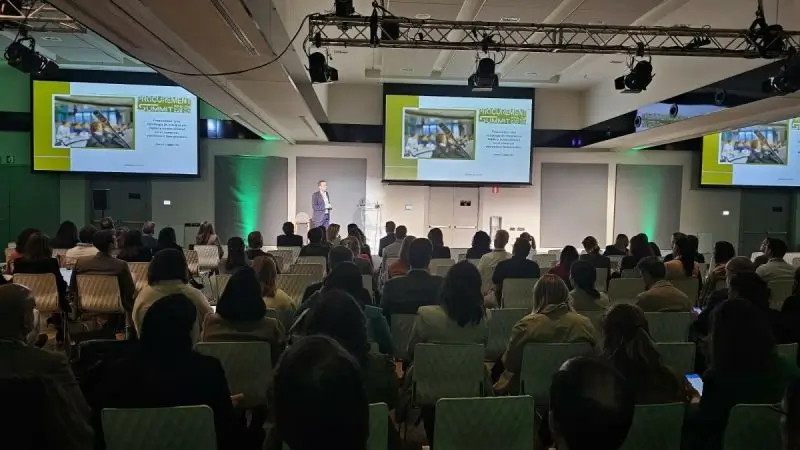
The lesson for your own surveys: growth and satisfaction can move together, but only if you measure both. Track attendance and NPS at every edition, so you can see whether a bigger event still keeps attendees happy.
How do you calculate and improve your survey response rate?
Your response rate is the share of people invited to the survey who completed it. Calculate it the same way after every event, and compare it with your own past editions.
Response rate = completed surveys ÷ people invited × 100.
- Who counts as “invited”: the people you actually sent the survey to. If you sent it to all checked-in attendees, use the number of checked-in attendees. Do not use registrations, because people who did not come cannot rate the event. (To reduce that gap, see how to prevent no-shows at your events.) If you sent it to one group only, such as sponsors, use the size of that group.
- What counts as “completed”: set a clear rule, for example “all required questions answered.” Count partial surveys separately, and keep the same rules at every edition.
- What the rate does not tell you: a high response rate does not mean respondents speak for every attendee. Step 3 below shows how to check who answered.
Example (sample data): the Future World Forum sent its survey to all 703 checked-in attendees and received 281 completed surveys, a response rate of 40%.
How can you increase your survey response rate?
These practices help people notice the survey and finish it. They are good starting points, not guarantees, so test what works for your audience.
- Announce it during the event: tell attendees in the closing session that a short survey is coming.
- Send it soon after the event: while memories are fresh.
- Say how long it takes: tell people the number of questions and minutes in the email.
- Keep the email simple: a clear subject line and one button to the survey.
- Send 1 or 2 reminders: more than that can feel like spam.
- Offer a small thank-you: for example, the session slides or a discount on the next edition.
- Show that feedback matters: tell attendees what you changed thanks to last year’s answers.
When and how should you send a post-event survey?
Send it by email soon after the event ends. Within 24 to 48 hours is a good starting point. Send 1 or 2 reminders, then close the survey after about 2 weeks and analyze the answers.
| When | What to do (suggested schedule) |
|---|---|
| Closing session | Announce the survey from the stage or on screens, with a QR code. |
| Day 1 to 2 after the event | Send the survey email to each audience. |
| Day 4 to 5 | Send the first reminder to people who have not answered. |
| Day 8 to 10 | Send the last reminder. |
| Day 14 | Close the survey and start the analysis. |
Email is the main channel because you have the address of everyone who registered. You can also share the survey link in your event app, on your event website, or as a QR code on screens at the end of the event.
How do you send a post-event survey with Eventtia?
- Create the survey: in the survey module, add your questions (text, rating, single choice or multiple choice), choose which attendee types will receive it, and enable it.
- Send it by email: in the Communication module, create an email to your attendees and add a button that links to the survey.
- Follow the results: the Statistics tab shows the results for each question as percentages. You can also download all the answers in one file with “Download Survey Results.”
The Eventtia Help Center explains each step.
Surveys are included in every Eventtia plan, so you do not need an extra tool or add-on. See Eventtia pricing for details.
Should you use a survey tool or your event platform?
Use a dedicated survey tool if you need advanced question logic or deep statistical analysis. Use your event platform if you want the survey to reach the right attendees automatically and to keep the answers next to your registration and check-in data.
Three popular survey tools are often used for event feedback:
- SurveyMonkey: a large library of question templates, answer logic and built-in analysis.
- Google Forms: free with a Google account, simple to set up, and answers go straight into Google Sheets.
- Typeform: shows one question at a time, which feels more like a conversation and works well on phones.
| Dedicated survey tool | Event platform (for example, Eventtia) | |
|---|---|---|
| Best for | Advanced logic, complex research, large question banks | Post-event feedback linked to your attendees |
| Who receives the survey | You export and import attendee lists | You choose attendee types directly in the platform |
| Where answers are stored | In a separate tool, apart from your event data | In the same place as registrations and check-ins |
| Post-event report | You combine survey and event data by hand | Survey results and event data are easier to put side by side |
| Extra cost | Depends on the tool and plan | Surveys are included in every Eventtia plan |
You can also use both: the event platform for the standard post-event survey, and a survey tool for a deeper study once a year. The questions in this guide work in any of them.
How do you use AI to write the best post-event survey questions?
Give an AI assistant, such as ChatGPT, Claude or Copilot, the details of your event and your goals. Ask it for a short draft survey for each audience. Then review the draft against the design rules in this guide before you send it.
A generic survey gives generic answers. If you ask the same questions after every event and nothing else, you learn little about what was new. When you tell the AI what you changed and what you want to learn, it can draft questions that fit your event in a few minutes. You keep your core questions and use AI for the rest.
What should you tell the AI?
- The event: type, format (in person, virtual or hybrid), length and number of attendees.
- The audiences: which groups you want to survey.
- Your goals: for example, satisfaction above 4 out of 5, or 6 sponsors renewing.
- What was new: a new venue, a new session format, a new check-in process.
- What you want to check: issues you suspect, such as long queues or a session that ran late.
- Your core questions: the questions you ask every time, so the AI does not replace them.
Which prompt can you copy?
You are an expert in event feedback surveys. Draft a post-event survey for [event name], a [one-day, in-person conference] with [800] attendees.
Audiences: [attendees, sponsors, exhibitors, speakers].
Our goals were: [list your goals]. This year we changed: [list the changes]. We want to check: [for example, check-in waiting time].
Keep these core questions unchanged: [paste your core questions].
Rules:
- For each audience: the core questions, plus up to 3 optional questions about this edition’s changes. Label the optional questions clearly.
- One topic per question.
- Use labeled 1 to 5 scales, from most negative (1) to most positive (5).
- Add “Not applicable” when a person may not have used a service.
- Include one NPS question on a 0 to 10 scale, followed directly by “What is the main reason for your score?”
- Put the other open questions near the end.
- No leading questions.
- Do not ask for information we already have from registration, such as company or job title.
For each question, give the answer options and the goal it measures. Then give the total number of questions and an estimated completion time, and remind me to check that time with a short test on a phone.
How do you check the survey the AI writes?
- One topic per question: split any question that uses “and” to join two topics.
- Neutral words: “How would you rate the workshop?” and not “How much did you enjoy our great workshop?”
- Labeled scales in one direction: 1 is always the most negative answer.
- A reason for every question: if you would not act on the answer, delete the question.
- No data you already have: do not ask for details collected at registration.
- A real test: answer the survey yourself on your phone and time it.
AI drafts fast, but you know your event and your audience. Read every question before you send the survey.
How do you analyze survey results with AI and add them to your post-event report?
Download your survey results, remove personal information, and upload the file to your AI assistant, such as Claude, ChatGPT or Copilot. Ask it to calculate the scores and the NPS, and to group the written comments into themes with counts. Then check the numbers yourself and add the summary to the feedback section of your post-event report.
AI is most useful for open answers. It can read every comment, group them by theme and count them. Your job is to check its work and decide what to do.
Step 1: Export and clean your results
In Eventtia, use “Download Survey Results” to get all the answers in one file. Before you share the file with an AI assistant, remove names, emails and phone numbers. Also check the written comments: people sometimes include names or contact details in them. Follow your company’s rules for AI tools.
Step 2: Ask the AI to analyze the answers
Here are the results of our post-event attendee survey for [event name]. We sent it to [703] checked-in attendees.
- Count the completed surveys (a completed survey has [all required questions answered]) and the partial surveys, separately. Calculate the response rate as completed surveys ÷ people invited.
- For each rating question, show its response scale, average, number of valid answers and answer distribution. Leave “Not applicable” and missing answers out of the average, and report their counts separately. Rank only questions that use the same measure and the same answer labels. Report the NPS separately.
- Calculate the NPS, with the number and % of promoters (9 to 10), passives (7 to 8) and detractors (0 to 6).
- Read all written comments and group them into themes. One comment can belong to more than one theme. For each theme, give the number of comments, say if it is mostly positive or negative, and add one short quote without personal details.
- List the 3 biggest strengths and the 3 biggest problems.
- Suggest 3 things to test at the next edition, each linked to a result.
Show your calculations. Use only the data in the file. Do not invent numbers.
Step 3: Check the AI’s work
- Totals: does the number of completed surveys match your file?
- NPS: recalculate it yourself. It only takes a minute.
- Themes: read some comments in each big theme. AI can merge two different topics or count the same comment twice.
- Who answered: compare the mix of respondents with the mix of attendees, for example by attendee type. If one group answered much more than the others, say so, and present the results as respondents’ feedback, not as the view of every attendee.
Step 4: Add the results to your post-event report
Your post-event report should have a feedback section with the same structure every time, so you can compare editions. Charts make the results easy to read in a few seconds. Here is what the feedback section looks like for the Future World Forum (sample data).
NPS: show the 3 groups, not only the score
A stacked bar shows how the NPS is built. Two events can both score +42 with very different shares of passives.
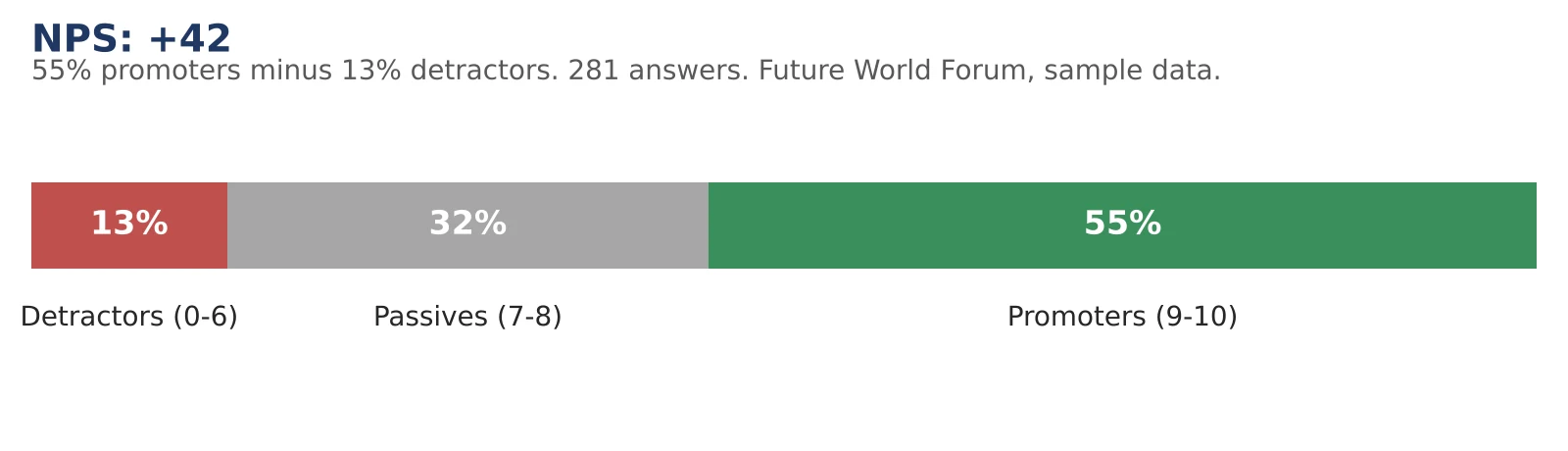
NPS chart: promoters, passives and detractors (sample data).
Rating questions: compare sessions on one scale
A bar chart of average scores shows at once which session worked best and which one to look at first.
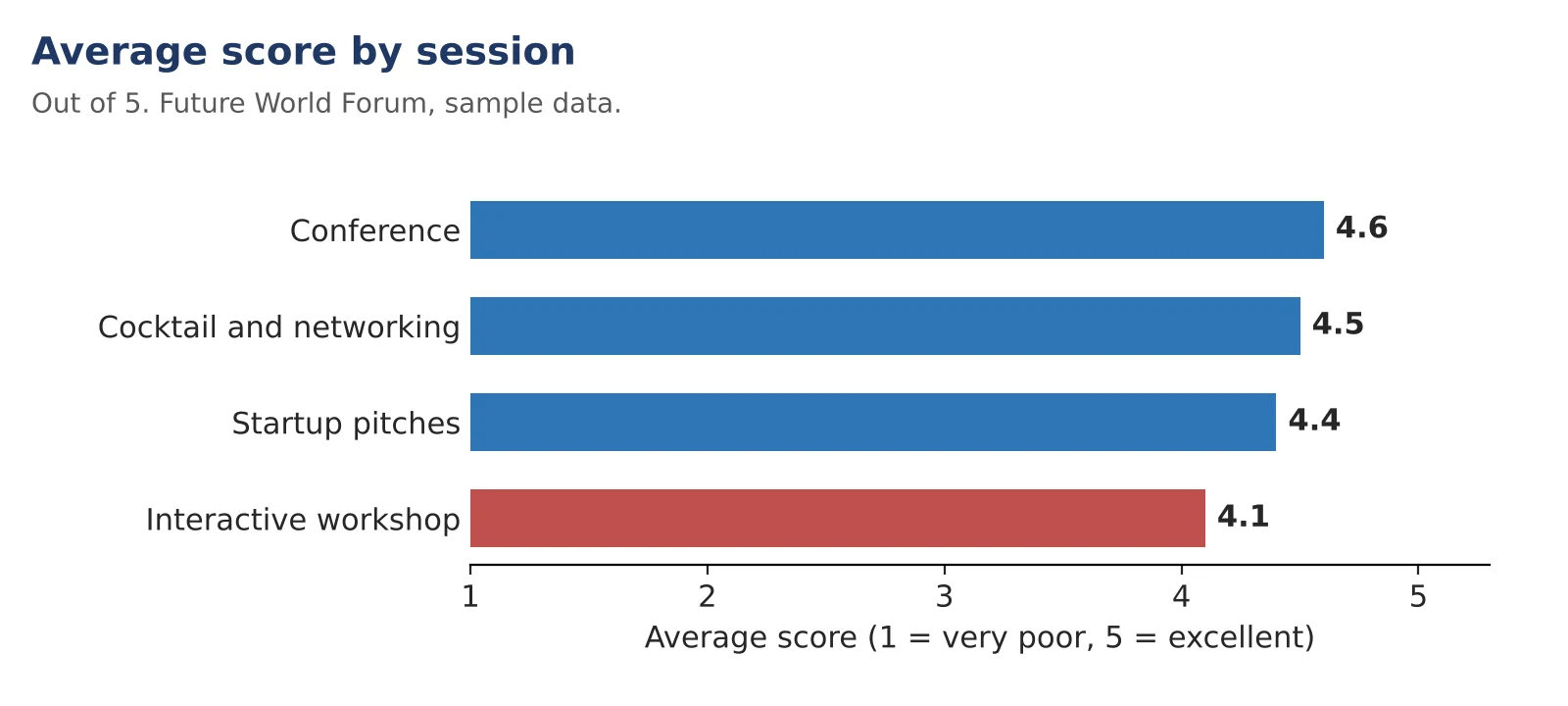
Average score by session, out of 5 (sample data).
Written comments: count the themes
Once the AI has grouped the comments, a bar chart shows the size of each theme. Use one color for strengths and another for problems.
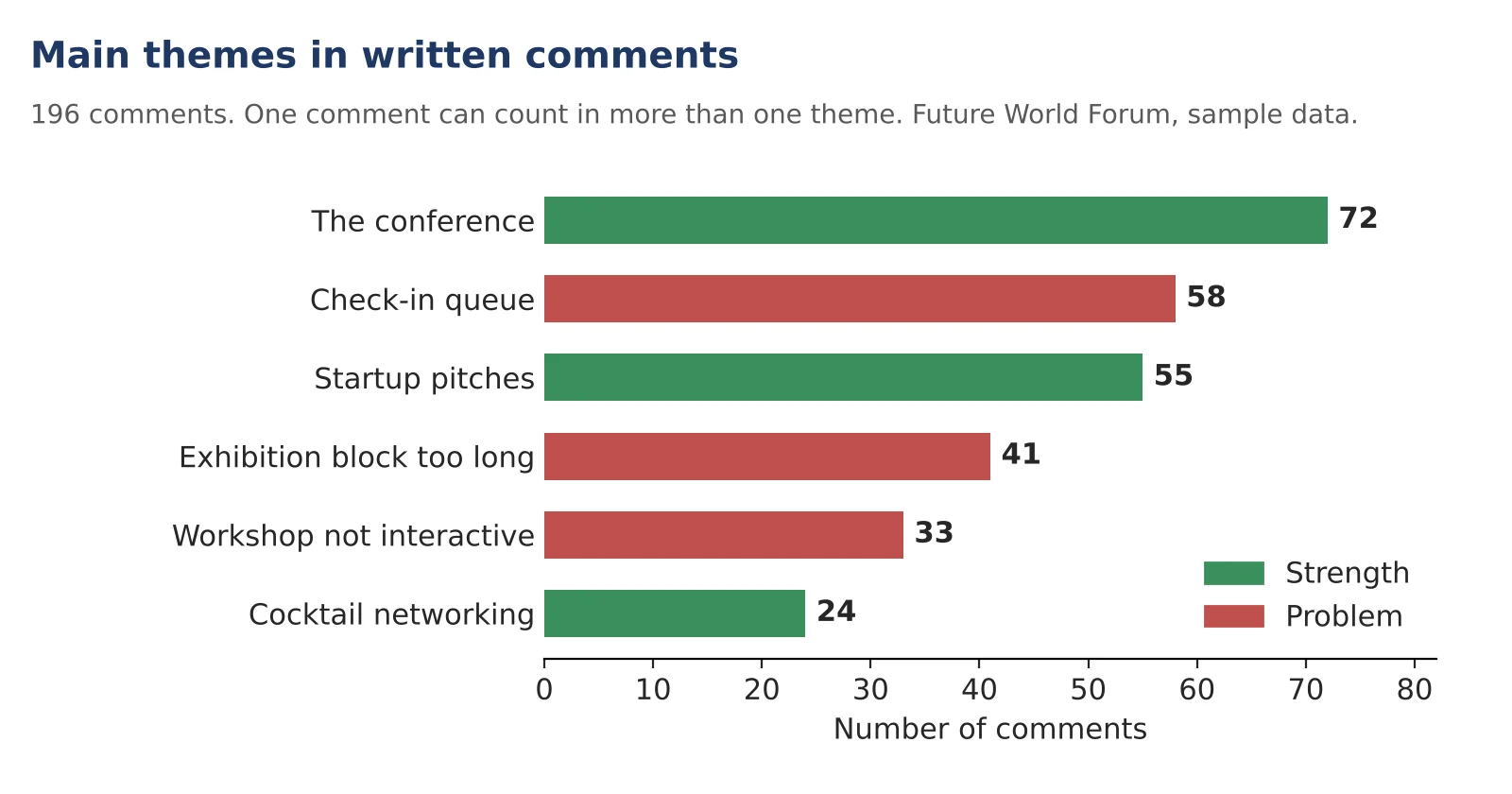
Main themes in written comments (sample data).
Return intent: show the full split
Group the 1 to 5 answers into 3 bands and show all of them, not only the positive ones. Unsure attendees are the group you can still win back.
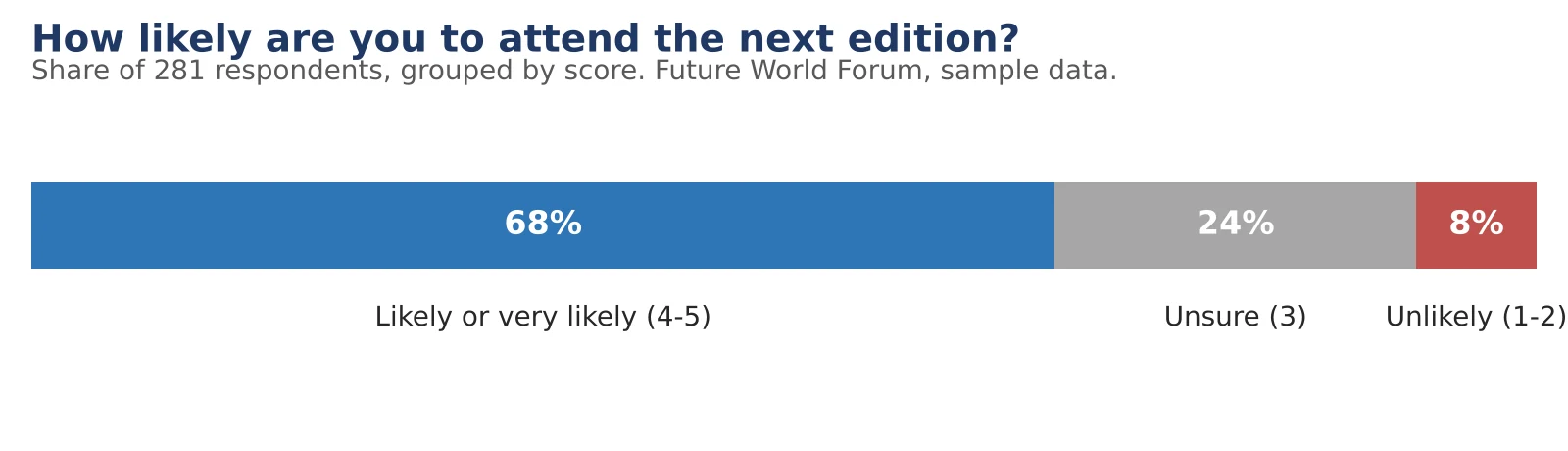
How likely are you to attend the next edition? (sample data).
Then summarize the key numbers in a table:
| Feedback result | Future World Forum (sample data) |
|---|---|
| Completed surveys | 281 of 703 checked-in attendees (40%) |
| Average satisfaction | 4.3 out of 5 |
| NPS | +42 (55% promoters, 32% passives, 13% detractors) |
| Best-rated session | Conference “Homo sapiens vs ChatGPT”: 4.6 out of 5 |
| Lowest-rated session | Interactive workshop: 4.1 out of 5 |
| Most mentioned problem | Check-in queue: 58 comments |
| Most mentioned strength | The conference: 72 comments |
| Change to test next time | Open doors at 11:15 and add one check-in lane |
Your report becomes stronger when you put feedback next to event data. In this example, 58 comments mention the check-in queue, and check-in data shows that 63% of attendees checked in during the same 30 minutes, between 12:00 and 12:30. That concentration is a likely cause of the queue. It is a hypothesis, not a proof, but it tells you what to test next time, and how to measure whether the change worked.
If your event platform connects to your AI assistant, the AI can pull this event data itself. For example, with the Eventtia MCP server, Claude, ChatGPT or Copilot can read check-in times and attendee types directly from Eventtia, while the survey answers come from the file you downloaded.
For the full method, read our guide on how to write a post-event report with AI.
Post-event survey questions: summary
| Topic | Key points |
|---|---|
| Core questions | Satisfaction, NPS and its reason, expectations, content, best session, check-in, networking, return intent, one improvement. Keep them the same every time. |
| Who to survey | Attendees, sponsors, exhibitors, speakers and guests, employees, volunteers. One survey per group. |
| Question design | One topic per question, labeled 1 to 5 scales in one direction, “Not applicable” when needed, open questions at the end. |
| NPS | 0 to 10 scale. % promoters (9 to 10) minus % detractors (0 to 6). |
| Satisfaction | Report the average (for example, 4.3 out of 5) or CSAT, the % of answers of 4 or 5. Say which one you use. |
| Response rate | Completed surveys ÷ people invited, with partial surveys counted separately. Compare with your past editions. |
| Timing | A good starting point: send within 24 to 48 hours, 1 or 2 reminders, close after about 2 weeks. |
| AI before the event | Give the AI your event, goals, changes and core questions. Check the draft against the design rules. |
| AI after the event | Upload the cleaned results. Ask for scores, NPS and themes with counts. Check the numbers. |
| Survey tool or platform | Survey tools (SurveyMonkey, Google Forms, Typeform) offer advanced logic. Your event platform keeps answers next to attendee data. |
| Post-event report | Add a feedback section and put it next to event data, such as check-in times. |
Frequently asked questions about post-event surveys
How many questions should a post-event survey have?
There is no fixed rule, but 8 to 10 questions is a practical starting point for most events. Short surveys are easier to finish. If you need more detail, send separate short surveys to each audience instead of one long survey.
When should you send a post-event survey?
Send it soon after the event, while attendees remember the details. Within 24 to 48 hours is a good starting point. Send 1 or 2 reminders and close the survey after about 2 weeks.
Should a post-event survey be anonymous?
Anonymous surveys can make people more comfortable sharing criticism. You can still ask broad questions, such as attendee type or industry, to compare groups. Avoid combining several details that could identify one person, such as job title, company and city. If you want to follow up, add an optional question asking if the person agrees to be contacted.
What is a good NPS for an event?
Any NPS above 0 means you have more promoters than detractors. The most useful comparison is with your own past editions. A rising NPS is a good sign, but other things also change between editions, such as the audience, the venue or the speakers, so look at the comments to understand why.
Can AI write a post-event survey?
Yes. An AI assistant like ChatGPT, Claude or Copilot can draft a survey in minutes if you give it your event details, goals and rules. Always review the draft for double questions, leading questions and questions you would not act on.
How do you send a post-event survey with Eventtia?
Create the survey in the survey module and choose which attendee types receive it. Then send it in an email from the Communication module, with a button that links to the survey. You can follow results in the Statistics tab or download all the answers in one file. Surveys are included in every Eventtia plan.
Eventtia is the platform behind the brands setting the standard.
Talk to us about how the platform fits into your stack: registration, communications, on-site and analytics, exposed deeply enough to compose.