Most event planners already use Claude to write. An invitation email, a session description, a sponsor pitch. Paste the brief, get the text, copy it into the event platform. It saves 20 minutes here and there, and the real work stays exactly where it was: in the settings screens, the exports and the spreadsheets.
That changed in 2026. Claude can now connect to your event management software and work inside it. It creates the event, the attendee types and the registration forms. It checks who has paid and who has checked in. It writes the post-event report from your real data. You describe what you want in plain language, Claude does the setup, and you review the result before it goes live. With the Claude in Chrome extension, you can even do this with Claude and Eventtia open side by side in the same browser window: you ask on the left, you watch the event take shape on the right.
This guide shows how to use Claude for event planning with real prompts and real screenshots, from the first connection to the final report. Every example below was run on Eventtia, an event management platform that connects to Claude through the Eventtia MCP server. If you use ChatGPT, Eventtia is also an official ChatGPT plugin: our step-by-step guide to managing event registrations with ChatGPT shows how to install it and run the same workflow.
Summary: what Claude can do for event planning
| Event planning task | What Claude does | What you still do |
|---|---|---|
| Event setup | Creates the event, attendee types, registration forms and custom fields from a brief | Write the brief, review the setup |
| Attendee communication | Drafts registration and welcome emails in your brand voice, translates them | Approve the messages, schedule them in your event platform |
| Multi-city programs | Replicates an event setup to new dates and cities | Check local details |
| Registration and payments | Lists who has registered and who has paid, splits revenue by attendee type | Pricing and refund decisions |
| Check-in and access control | Creates checkpoints and reports check-ins in real time | On-site staffing |
| Reporting | Answers questions and writes the post-event report, for one event or all of them | Decide what to change next time |
| Dashboards | Builds a web dashboard from your event data, refreshed daily, no developer needed | Choose the metrics |
How do you connect Claude to your event platform?
You connect Claude to your event platform through MCP (Model Context Protocol), an open standard that lets an AI assistant use software on your behalf. If your event management software has an MCP server, the connection is a login, not a project. With Eventtia it takes under 5 minutes and no code:
- In Claude, open the connectors library and search for “Eventtia”.
- Click Connect and sign in with your Eventtia account.
- Test it with a first prompt: “List my upcoming events.”
From that moment, Claude can see and manage your events with the same rights as your Eventtia account. A user who cannot delete an attendee in Eventtia cannot delete one through Claude either. Every action appears in Eventtia’s activity log under your name, and Eventtia does not train AI models on your prompts or your event data. The MCP server is included with every Eventtia plan, with no add-on and no usage tier.
Two things to know before you start. Claude works best when you give it a complete brief in one message rather than ten small ones. And you stay in control: Claude proposes, creates and reports, but nothing goes live without your review inside the event platform.
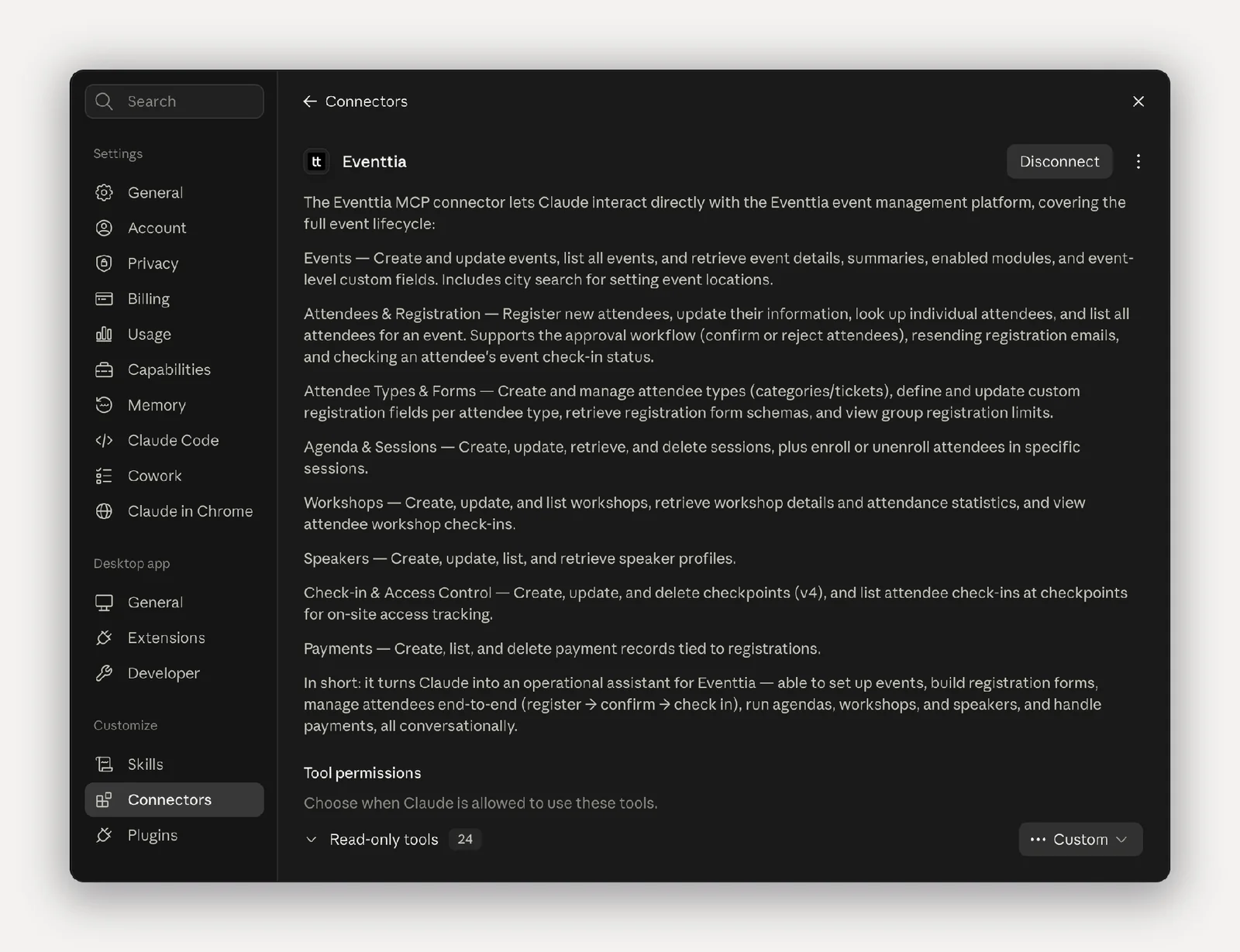
Eventtia’s connector for Claude
Use Claude and Eventtia side by side in the same browser window
The best way to work is with the Claude in Chrome extension. It opens Claude as a side panel in Google Chrome, so you can have Claude on one side and Eventtia on the other, in the same window, at the same time. You type a prompt in the panel, Claude creates the attendee types or the checkpoints, and you see them appear in Eventtia a second later without switching tabs. If something is not what you wanted, you correct it in Eventtia by hand or ask Claude to change it, right there.
This changes how it feels to work with an AI agent. It is not a black box you send instructions to and check later. It is a colleague sitting next to you, doing the setup while you watch, with the event platform open in front of both of you. Every screenshot in this guide was taken this way.
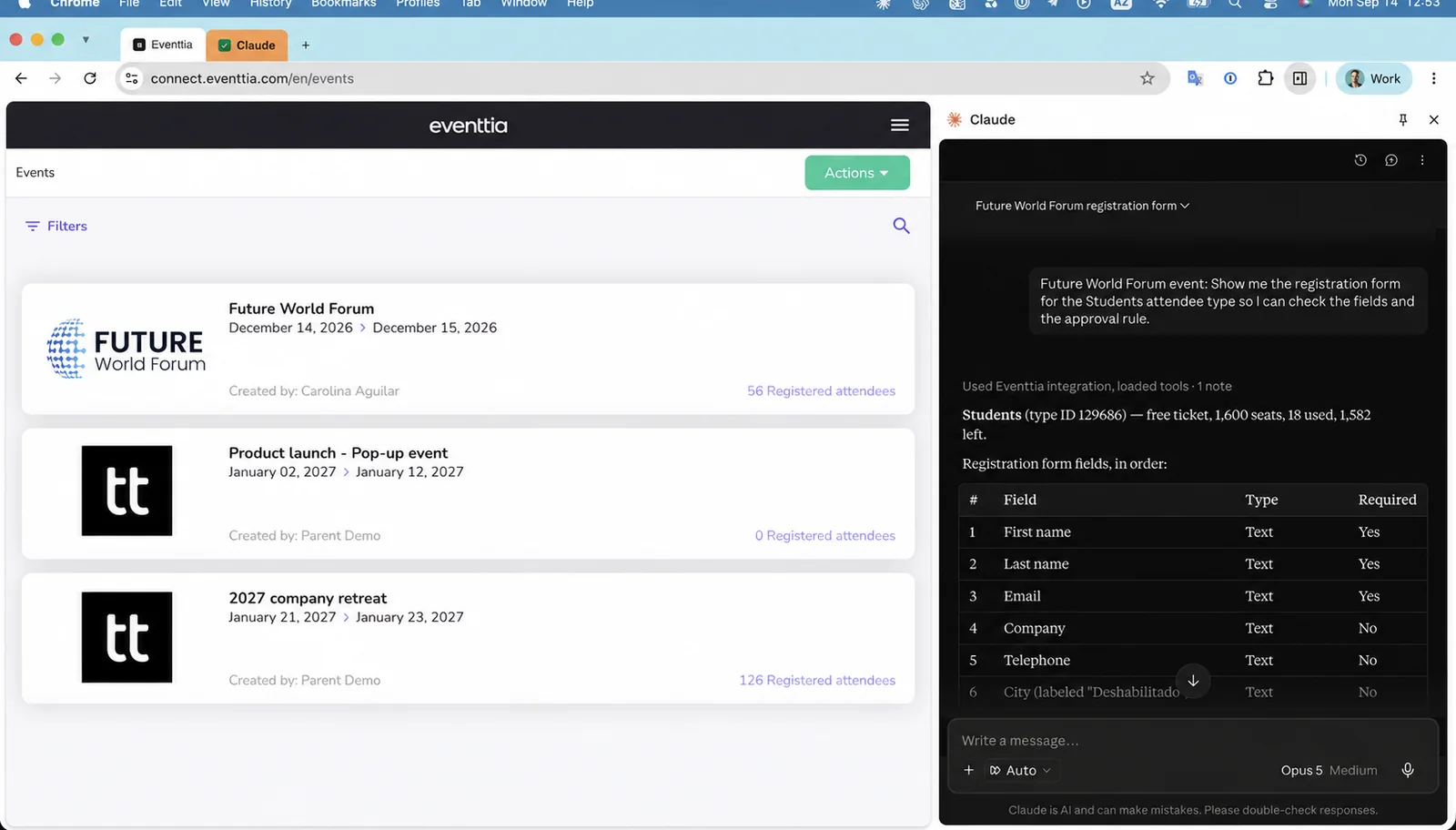
Claude used together with Eventtia in the Chrome browser
How to set up an event with Claude
Event setup is where Claude saves the most time. Instead of clicking through settings, you describe the event and Claude builds it: the event itself, the attendee types, the registration forms and the custom fields. A setup that takes 1 to 2 hours by hand takes a few minutes, and you review it before registration opens.
Configure attendee types and registration forms from a simple brief
A typical event has 3 to 6 attendee types: employees, clients, press, partners, VIPs, speakers. Each one needs its own form fields, its own approval rule and often its own price. With Claude connected to your event platform, you write the brief once and Claude creates every type and every field. Rules like “students need approval” or “press must provide a media outlet” are part of the brief.
A good brief contains the event name, dates and venue, the attendee types with their prices and capacities, the fields per type, and which types need approval. Keep it to 10 lines. Claude asks when something is missing.
Prompts to try with Claude connected to your event platform
- “Create an event called Future World Forum, on December 14 and 15, 2026, at the Manhattan Center, 311 W 34th St, New York. Create 3 attendee types: Standard at 180 USD, Startups at 450 USD, and Students free of charge, approval required, with a mandatory field for the university name.”
- “Add a mandatory field called Dietary requirements to the Standard attendee type, with the options None, Vegetarian, Vegan and Gluten-free.”
- “Show me the registration form for the Students attendee type so I can check the fields and the approval rule.”
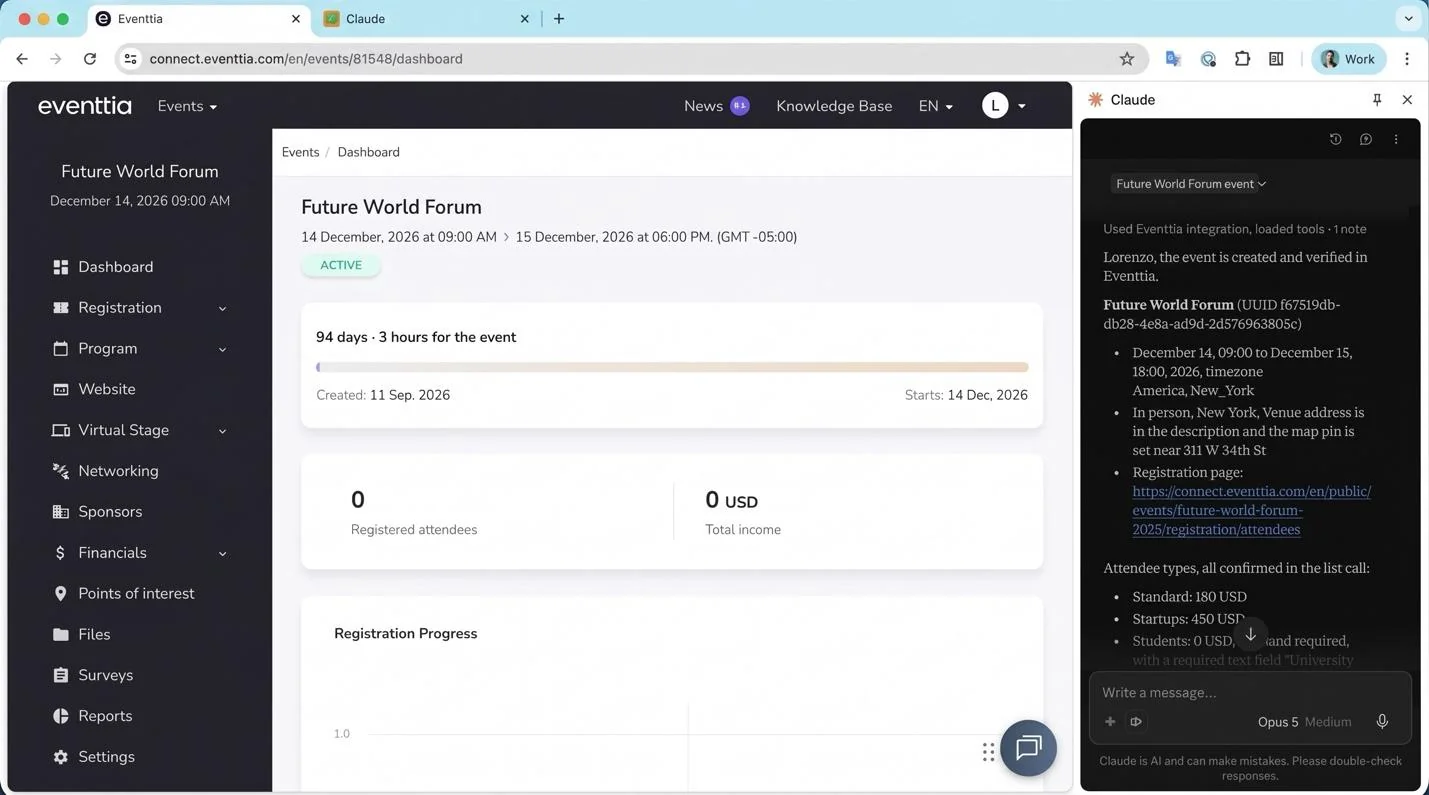
Example of event setup with Claude and Eventtia’s MCP, using the Claude in Chrome extension
Write attendee communications in your event brand voice
Once the event exists, Claude can draft the registration and welcome messages for it, in the tone you give it, and translate them for an international audience. You then load the approved messages into your event platform’s communications tool and schedule them. Claude drafts, you approve, the event platform sends.
Prompts to try with Claude connected to your event platform
- “Write the welcome emails for the Future World Forum event in Eventtia. Use a warm and professional tone.”
- “Translate this welcome email into Spanish, French and German, keeping the same tone of voice.”
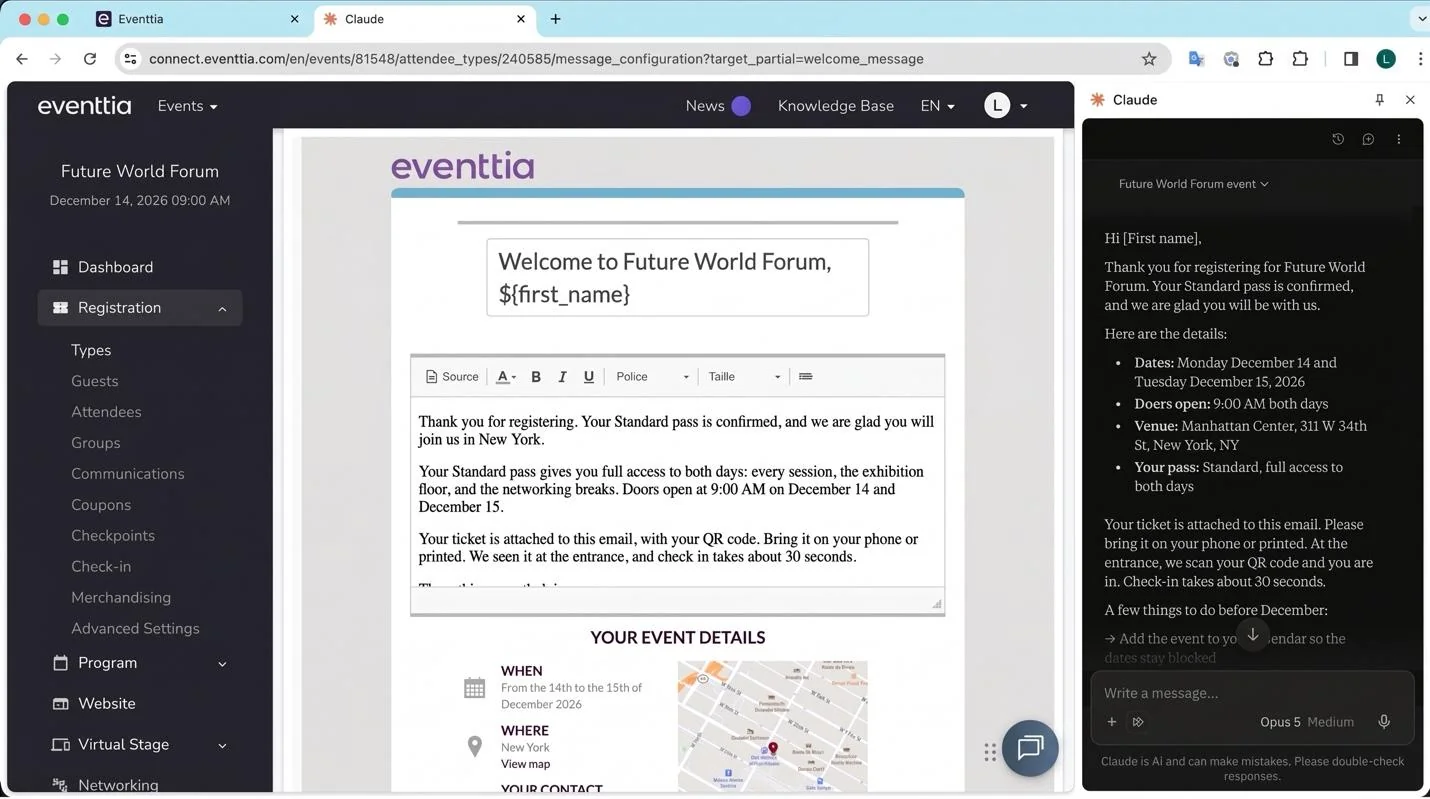
Example of event registration message created with Claude and Eventtia’s MCP
Reuse the same event setup across a multi-city program
This is where Claude makes the biggest difference for teams running many events a year. The same product launch runs in 12 cities. Instead of copying the settings 12 times, you ask Claude to read the first event and create the others with the local dates and cities. The structure stays identical, which is what makes cross-event reporting possible later.
Prompt to try with Claude connected to your event platform
- “Replicate the Future World Forum event to Miami on January 2, 2027, San Francisco on January 4, 2027, and Los Angeles on January 6, 2027.”
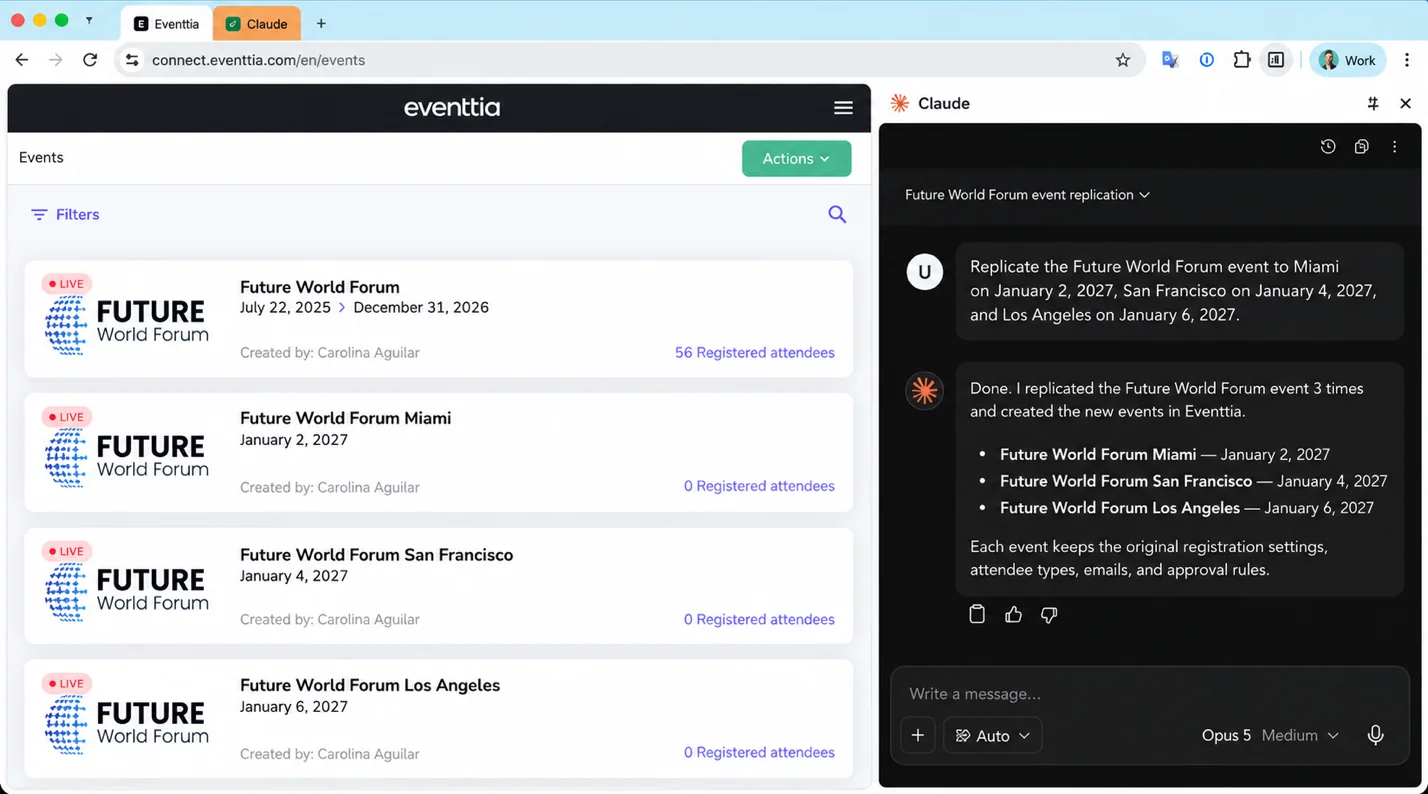
Example of event replication with Claude and Eventtia’s MCP
How to simplify event operations with Claude
Operations are everything that happens after registration opens: payments, tickets, check-in, session access. They produce the side spreadsheets most teams still keep. With Claude connected to your event management software, most of those spreadsheets become a question.
Monitor registrations and payments
Claude can list registrations per attendee type, show who has not paid and split revenue by ticket. Ask “which Startups attendees have not paid” and you get the answer without an export. Claude monitors the data and proposes next steps. Pricing and refund decisions stay with you.
Prompts to try with Claude connected to your event platform
- “List the Startups attendees of the Future World Forum who have not paid yet.”
- “How much revenue has the event collected so far, split by attendee type?”
- “Show me all Students registrations waiting for approval, with the university they entered.”
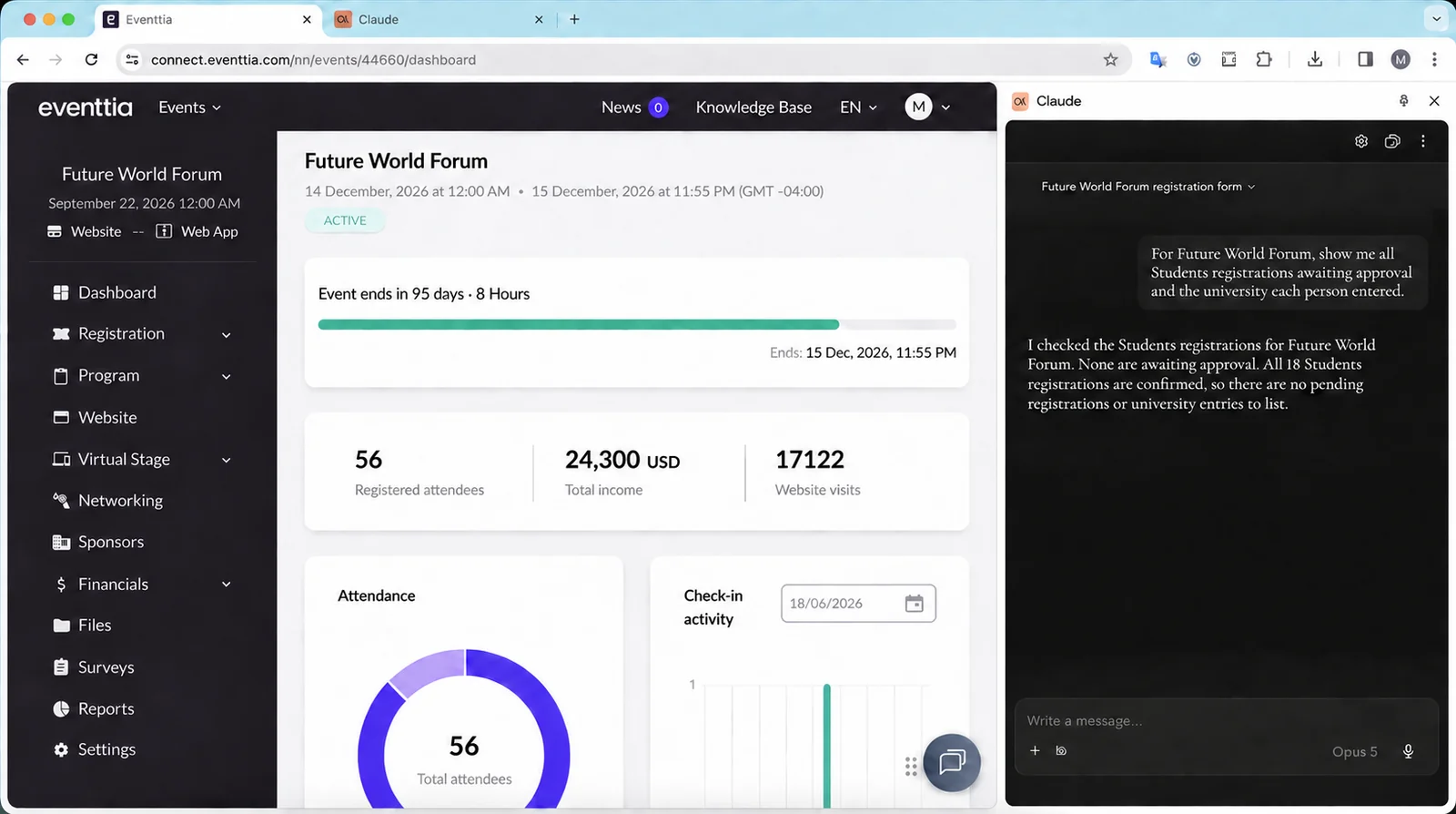
Example of event registration data monitored with Claude and Eventtia’s MCP
Monitor check-in and real-time attendance
Before the event, Claude creates the checkpoints (main entrance, VIP lounge, workshop rooms) and their access rules. During the event, you ask “how many attendees checked in so far” and get the number from the check-in app data in real time, split any way you need.
Prompts to try with Claude connected to your event platform
- “Create 3 checkpoints for the Future World Forum: Main Entrance, VIP Lounge (Startups and speakers only) and Workshop Room A.”
- “How many attendees have checked in at the Main Entrance so far today, split by attendee type?”
- “Which registered Standard attendees have not checked in yet?”
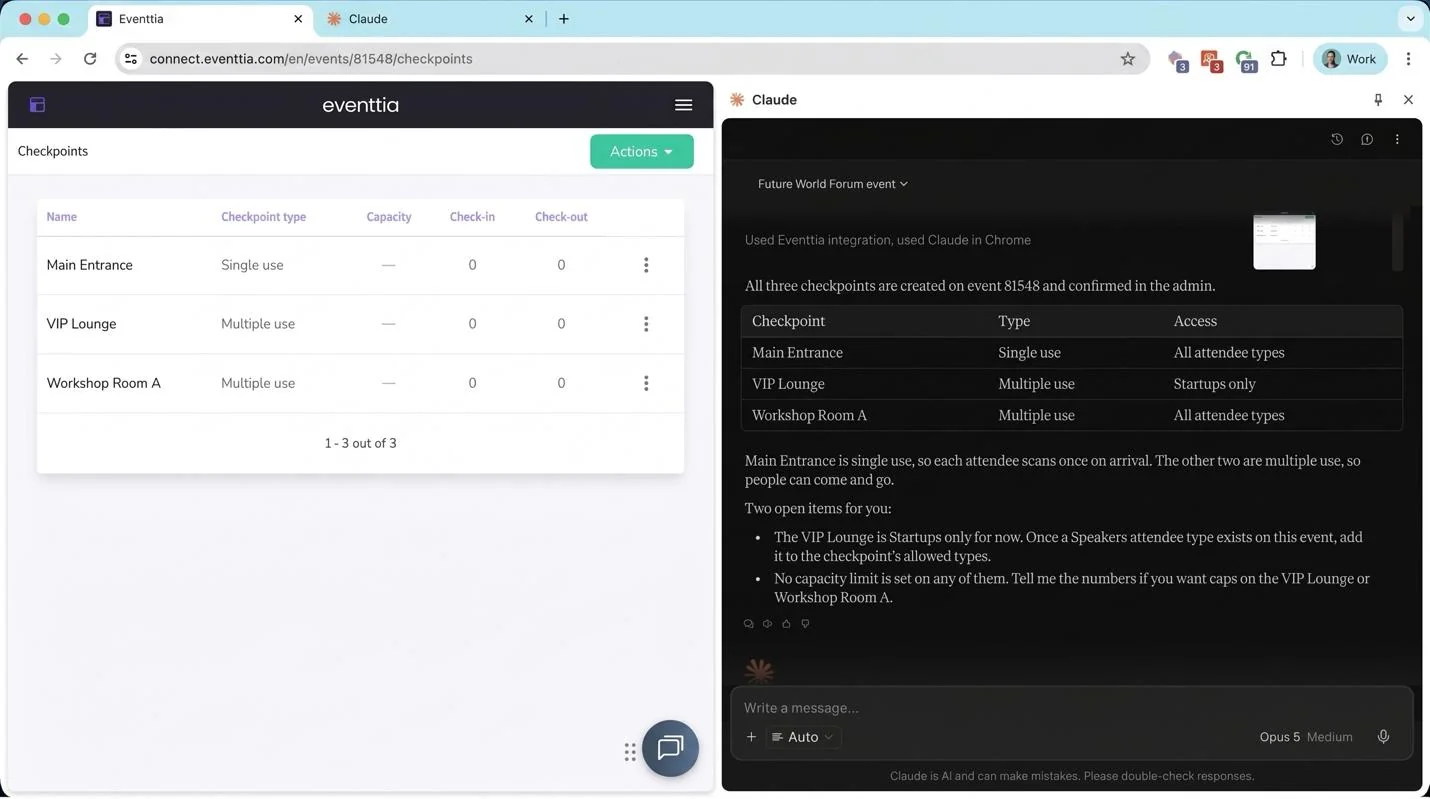
Example of checkpoint creation with Claude and Eventtia’s MCP
How does Claude simplify and improve event reporting?
Think about how reporting works today. The event ends on Friday. On Monday you open the event platform and export the attendee list. Then the check-in list. Then the payments. You paste all three into a spreadsheet, match the columns, build the pivot table, rebuild the same charts you built last time, and write the summary around them. Two days later the report goes out, and by then nobody remembers the questions they wanted answered.
For a team running many events a year, it gets worse. Each event lives in its own export, each export is shaped a little differently, and nobody has the time to put 30 of them side by side. So the questions that would actually change the next event never get asked. Which city has the worst show rate. Which attendee type registers late every single time. Which session format fills the room and which one never does. The data exists. The answer is buried in 30 spreadsheets nobody will open.
Claude removes the export step. It reads your event data directly in the event platform and answers in plain language, for one event or for all of them at once. The post-event report goes from two days of spreadsheet work to a conversation. And the cross-event question that used to be impossible becomes a single prompt.
Simplify event data analysis and report writing
Start with the event you just ran. Ask for registrations per day since registration opened, attendance per attendee type, or the sessions with the highest enrollment. Claude reads the numbers and gives you the answer with a short summary you can paste straight into the report. Ask for the whole report and it writes it, including recommendations for next year. The real gain is not the writing, it is the follow-up: when a number looks odd, you ask why right there and Claude goes back to the data. No new export, no new pivot table. You can ask 10 questions in the time it used to take to answer one.
Then do the same across your whole program. Claude can read every event in your account in the same conversation, so you stop asking “how did the New York event go” and start asking “which of my 30 events went best, and what did we do differently there”. One prompt, one answer, across a whole year of events.
Those questions are worth real money. If partners register 3 weeks later in Miami than in Houston, you open registration earlier in Miami. If one attendee type has a 40% show rate everywhere, you fix the reminder sequence for that type instead of guessing. If a session format fills the room in every city, you schedule more of it. None of this needs new data. It only needs someone able to look at all of it at once, which is exactly what nobody had time for before.
Prompts to try with Claude connected to your event platform, for one event or for all of them
- “Give me the registrations per day for the Future World Forum since registration opened, and the total per attendee type.”
- “Which sessions on Day 1 had the most enrollments, and which ones were below 50% of the room capacity?”
- “Write a one-page post-event report for the Future World Forum: registrations, attendance rate per attendee type, sessions with the highest enrollment, and 3 recommendations for next year.”
- “Across all my 2026 events, what is the show rate per attendee type, and which city has the lowest?”
- “Compare registrations 30 days before the event for the Future World Forum events in Miami, San Francisco and Los Angeles and tell me which one is behind.”
- “Look at all my events this year and tell me which 3 changes would improve attendance the most next year.”
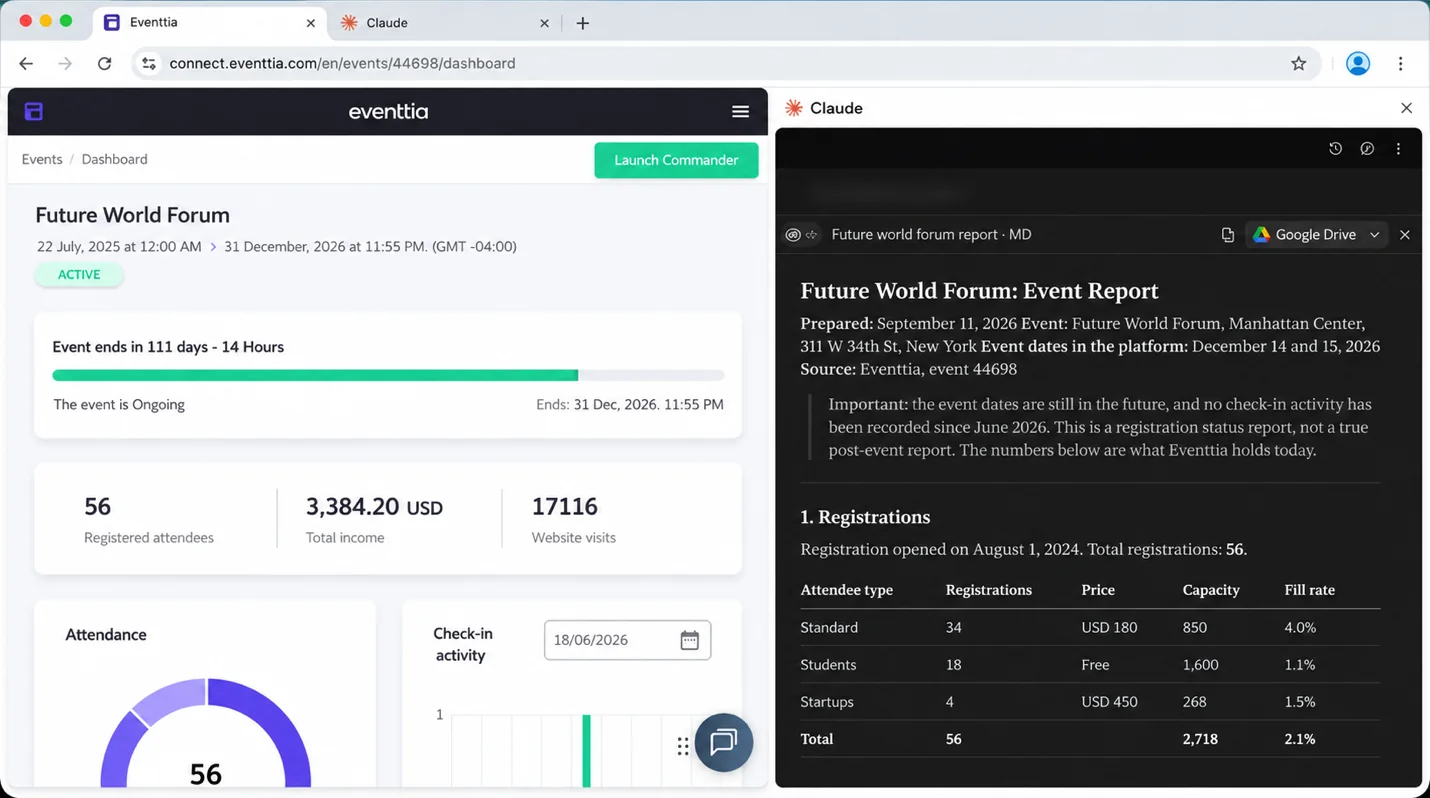
Example of event report created with Claude and Eventtia’s MCP
Build your own event dashboards without a developer
Reports answer a question once. A dashboard answers it every morning. With the same connection, you describe the dashboard you want and Claude builds it as a web page from your event data: registrations per event, show rate per attendee type, revenue per city, whatever you track. It refreshes automatically every day, and you did not open a ticket with IT or wait for a developer.
For an event team, this replaces the weekly ritual of rebuilding the same charts before the Monday meeting. The dashboard is already current when you open it. Your manager can open the same link instead of asking you for the numbers. And when the question changes, you ask Claude to change the dashboard rather than starting a new spreadsheet.
Prompts to try with Claude connected to your event platform
- “Build me a web dashboard with registrations per event, show rate per attendee type and revenue per city, refreshed every day from my Eventtia data.”
- “Add a chart to the dashboard showing registrations per day for the next 3 events, compared to the same point before last year’s events.”
- “Create a simple weekly view for my manager: total registrations, revenue and remaining capacity for every upcoming event.”
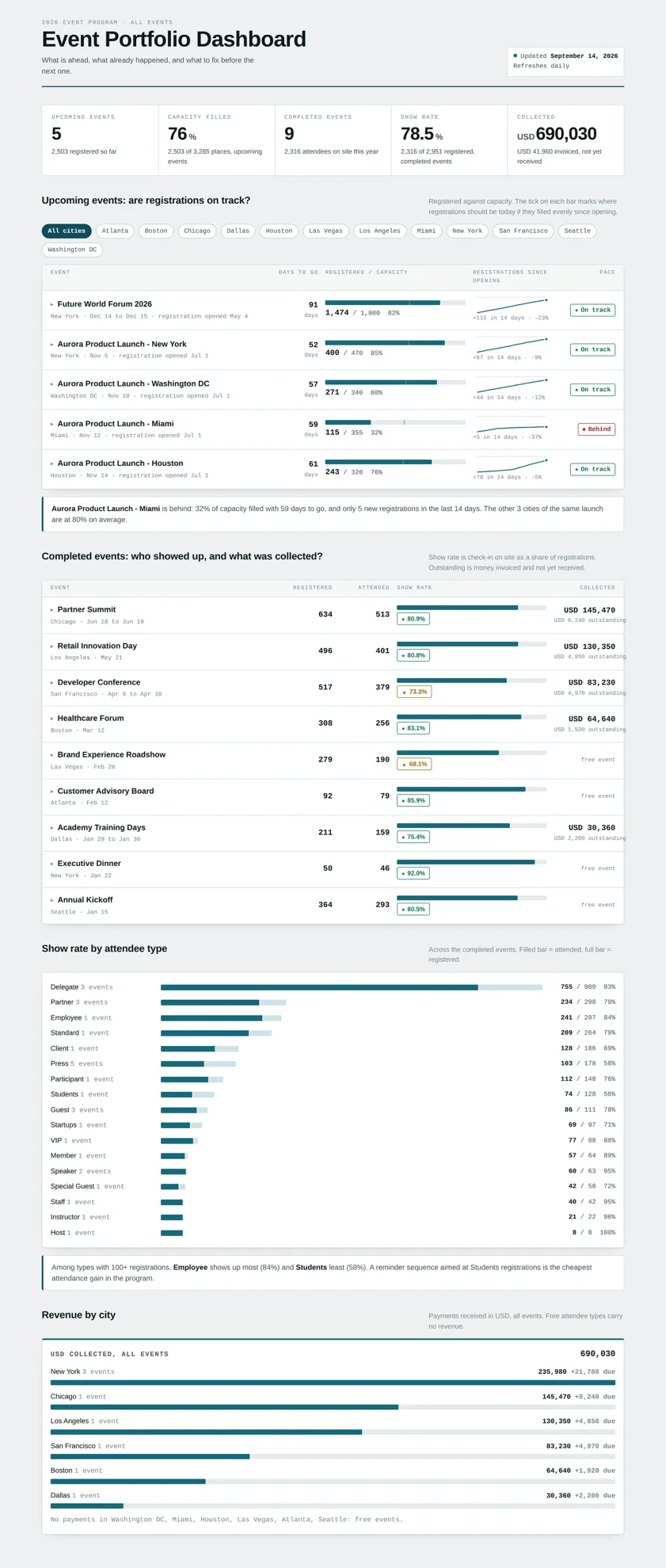
Example of event dashboard created with Claude using event data from Eventtia
For the full method, with the prompt we used and a live dashboard for one event, read how to build a live event dashboard with Claude AI.
Case study: how AMVO simplifies event management with Eventtia
AMVO, the Mexican Association of Online Sales, runs over 50 events a year on Eventtia, including FORWARD, a congress with 1,200 decision-makers. “With Eventtia, we’ve increased attendance and sponsorship by 50% at FORWARD, and reduced time spent on logistics, so we can now focus on content and experience,” says Pierre-Claude Blaise, CEO at AMVO. Read the full AMVO success story.
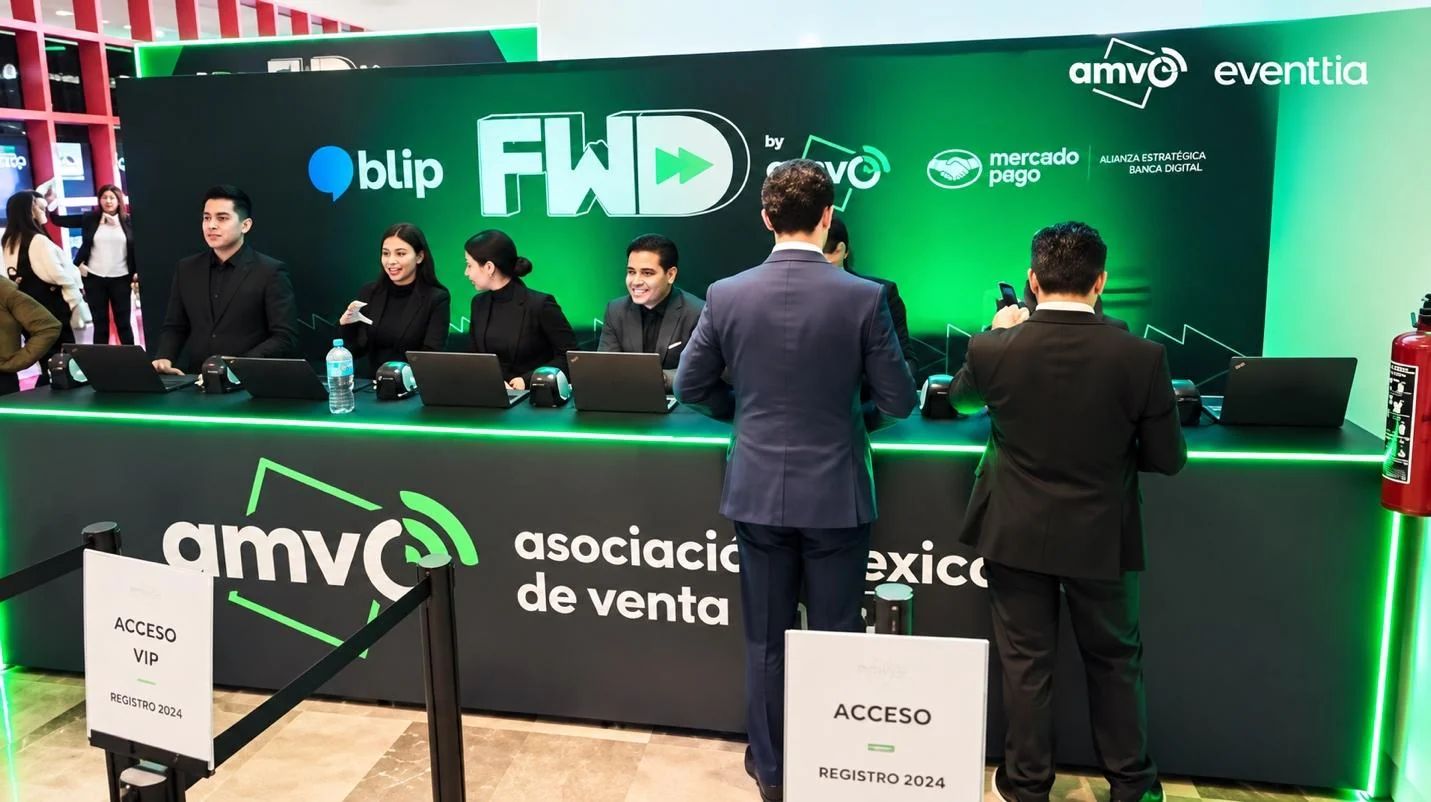
AMVO FWD event powered by Eventtia
Conclusion
Using Claude for event planning is no longer about writing faster. It is about handing the setup, the monitoring and the reporting to an assistant that works inside your event platform, and keeping the decisions for yourself. Start with one event: connect Claude, paste the setup prompt above, and review what it built. If you want to try it on your own account, connect Eventtia to Claude today.
Eventtia is the platform behind the brands setting the standard.
Talk to us about how the platform fits into your stack: registration, communications, on-site and analytics, exposed deeply enough to compose.