To measure event success, set a target for each event goal before registrations open. Then track 10 to 15 KPIs across registration and attendance, engagement, finances, marketing and sales, and sponsors, and compare each result with its target before, during and after the event.
This guide gives you the 15 event KPIs most teams report on, a formula for each one, a dashboard layout for each phase of the event, and a worked example. It also shows how to build that dashboard with ChatGPT, Claude or Copilot from your own event data.
Measuring events is no longer optional. In a 2026 survey of 162 meeting and event professionals by Global DMC Partners, 68% of planners reported stakeholder pressure to prove the business impact of their events. Yet only 30% use data or analytics tools to track ROI, and 44% have no ROI tracking in place at all. The KPIs, formulas and tools below close that gap.
What does it mean to measure event success?
Measuring event success means comparing what happened at your event with the targets you set before it. Success has three layers:
- Audience: did the right people register and attend?
- Experience: what did they do at the event, and how did they feel about it?
- Business results: what did the event bring to your organization, its sponsors and its partners?
A full venue can still be a failure if the wrong people came. A small event can be a big success if 40 decision makers met your sales team. That is why no single number defines success. Your goals decide which numbers matter.
What is the difference between event metrics and event KPIs?
A metric is any number your event platform records. A KPI (key performance indicator) is a metric you compare against a target, because it tells you whether you reached a goal.
For example, “860 registrations” is a metric. “860 registrations against a target of 900” is a KPI result: you reached 96% of your target. Your event platform records hundreds of metrics. You only need 10 to 15 KPIs.
How do you choose the right KPIs for your event?
Start from the goal of your event, then pick 3 to 5 KPIs that prove you reached it. Write a target number for each KPI before registrations open, and agree on it with your team, your leadership and your sponsors.
| Event goal | KPIs to track | Example target |
|---|---|---|
| Brand awareness | Registrations vs target, registrations by channel, new contacts, media mentions | 1,000 registrations, 40% new contacts |
| Leads and pipeline | Leads, SQLs, meetings held, cost per lead | 150 leads and 30 SQLs within 30 days |
| Revenue | Revenue vs plan, cost per attendee, profit vs target | Revenue at 100% of plan |
| Community and loyalty | Attendance rate, satisfaction, NPS, returning attendees | NPS of +40, 35% returning attendees |
| Sponsor value | Sponsor satisfaction, renewal intent, meetings held, booth traffic | 4 of 6 sponsors want to return |
The example targets above are illustrations, not industry benchmarks. Your best baseline is your own previous edition. Three simple rules help:
- Keep 10 to 15 KPIs in total, and choose 3 to 5 headline KPIs for leadership.
- Use the same definitions every year, so you can compare editions.
- Give each KPI one owner who reports it.
What are the 15 most important event KPIs?
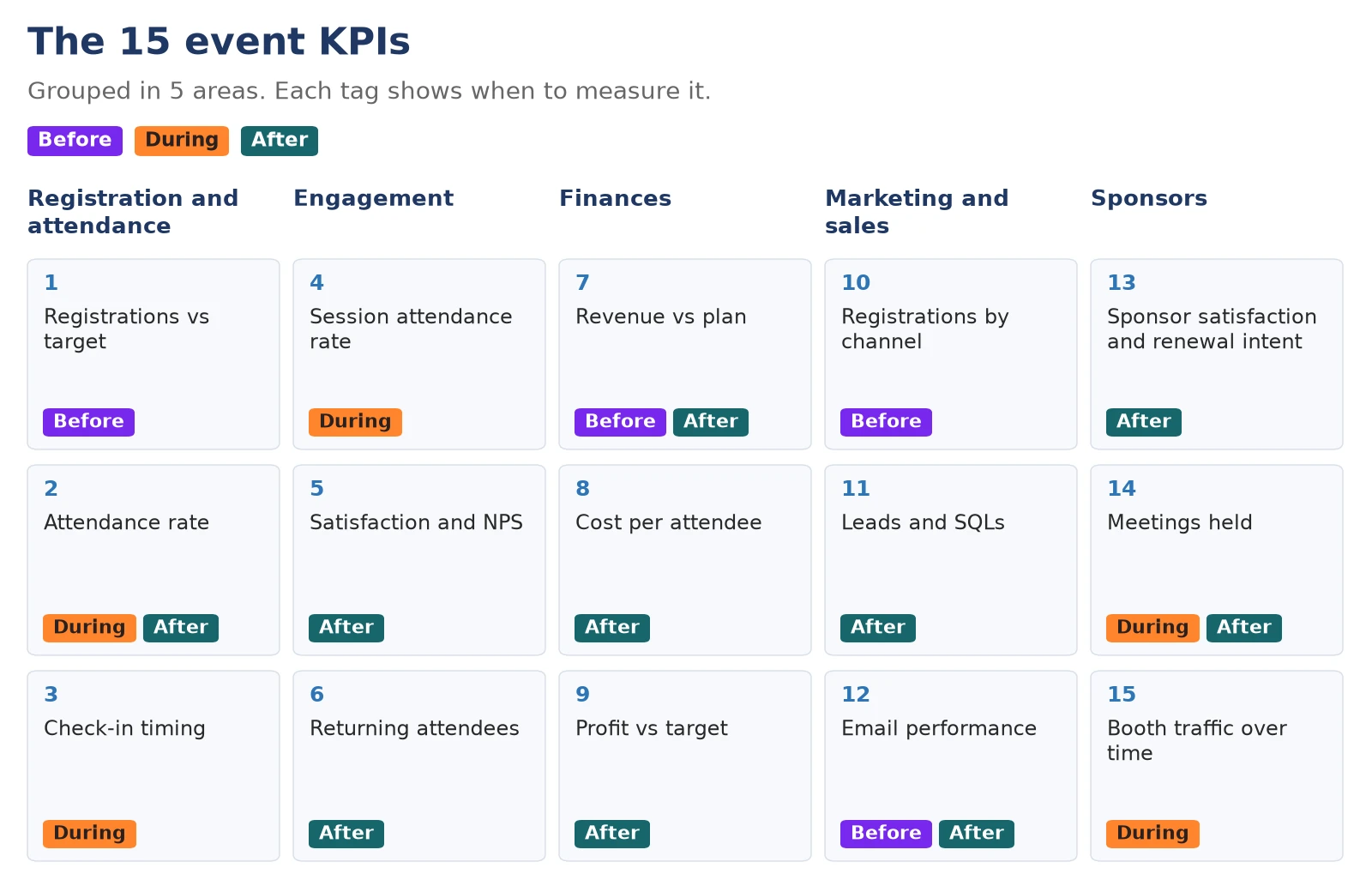
The 15 KPIs below cover the five areas most event teams report on: registration and attendance, engagement, finances, marketing and sales, and sponsors. The table gives the formula for each KPI, the moment to measure it and where the data comes from.
| # | KPI | Formula | When | Data source |
|---|---|---|---|---|
| 1 | Registrations vs target | Registrations ÷ target × 100 | Before | Event platform |
| 2 | Attendance rate | Checked in ÷ registered × 100 | During, after | Check-in app |
| 3 | Check-in timing | Check-ins per 30-minute slot ÷ total check-ins × 100 | During | Check-in app |
| 4 | Session attendance rate | Session check-ins ÷ enrolled × 100 | During | Session check-in |
| 5 | Satisfaction and NPS | Average score (1 to 5); NPS = % promoters − % detractors | After | Attendee survey |
| 6 | Returning attendees | Returning attendees ÷ total attendees × 100 | After | Event platform |
| 7 | Revenue vs plan | Actual revenue ÷ planned revenue × 100 | Before, after | Ticketing and payments |
| 8 | Cost per attendee | Total costs ÷ checked-in attendees | After | Budget, check-in |
| 9 | Profit vs target | Revenue − costs, compared with target | After | Budget, payments |
| 10 | Registrations by channel | Registrations from a channel ÷ total × 100 | Before | Tracking links, form |
| 11 | Leads and SQLs | SQL rate = SQLs ÷ leads × 100 | After | CRM |
| 12 | Email performance | Opens ÷ delivered; clicks ÷ delivered | Before, after | Email tool |
| 13 | Sponsor satisfaction and renewal intent | Average score; sponsors who want to return ÷ all sponsors | After | Sponsor survey |
| 14 | Meetings held | Meetings held ÷ meetings requested × 100 | During, after | Matchmaking |
| 15 | Booth traffic over time | Visits or scans per booth per hour | During | Lead capture, checkpoints |
Which registration and attendance KPIs should you track?
Track three KPIs: registrations against your target, the attendance rate, and check-in timing. Together, they tell you if enough of the right people signed up, how many came, and when they arrived.
1. Registrations vs target
Do not wait for the final number. Watch the registration curve: how many people had registered 30 days, 7 days and 1 day before the event. A slow curve 30 days out is your signal to push marketing while there is still time. Split registrations by pass or ticket type too, because one weak ticket type can hide behind a good total.
2. Attendance rate
Attendance rate = checked-in attendees ÷ registered attendees × 100. Also count no-shows (registered minus checked in) and walk-ins. Look at the rate by pass type: free passes usually lose more registrants than paid ones. Use the words “checked in” in your reports, not “arrived,” because your check-in app records when each check-in was completed. To lower your no-show rate, read our tips on how to prevent no-shows.
3. Check-in timing
Check-in timing shows the share of check-ins in each 30-minute slot. If more than half of your attendees check in during the same 30 minutes, you will have a queue at the door. The fix is simple: open the doors earlier, add a check-in lane, or stagger arrival times by pass type.
Which engagement and experience KPIs should you track?
Track session attendance, satisfaction and NPS, and returning attendees. These KPIs show what people did at your event and how they felt about it.
4. Session attendance rate
Session attendance rate = session check-ins ÷ attendees enrolled in the session × 100. For open sessions, divide by total checked-in attendees instead. Compare it with the session score from your survey. A full session with a low score needs a better format, not a bigger room.
5. Satisfaction score and Net Promoter Score (NPS)
Ask attendees for an overall satisfaction score on a 1 to 5 scale, then ask the NPS question: “On a scale from 0 to 10, how likely are you to recommend this event to a friend or colleague?” Promoters answer 9 or 10, passives 7 or 8, and detractors 0 to 6.
NPS = % of promoters − % of detractors, on a scale from −100 to +100. For example, if 100 attendees answer and 55 are promoters, 32 are passives and 13 are detractors, your NPS is 55 − 13 = +42. Track the trend from one edition to the next, and read the written comments: they tell you why the score moved. For the questions to ask and a full survey template, use our guide to post-event survey questions.
6. Returning attendees and intent to return
Returning attendees = attendees who came to a previous edition ÷ total attendees × 100. Add the survey question “Will you attend next year?” to see future loyalty. Attendee behavior adds more signals: which sessions people chose, whether they booked meetings, and whether they agreed to receive follow-up from your team. Use these signals to group contacts into cold, warm and hot leads for your sales team.
Which financial KPIs should you track?
Track revenue against plan, cost per attendee and profit against target. These three KPIs tell you if the event paid for itself.
7. Revenue vs plan
Compare actual revenue with planned revenue for each source: each ticket type, sponsors and other income. A total that looks fine can hide one ticket type that sold far below plan.
8. Cost per attendee
Cost per attendee = total costs ÷ checked-in attendees. Divide by the people who checked in, not by registrations, because you pay for the people in the room. Compare it with revenue per attendee.
9. Profit vs target
Profit = total revenue − total costs. Compare it with the profit target you set before the event. Your event ROI comes from the same numbers: ROI = profit ÷ costs × 100. For the full method and a worked example, read our event ROI guide.
Which marketing and sales KPIs should you track?
Event marketing KPIs measure how well your promotion filled the event and how many business contacts it created. Track registrations by channel, leads and SQLs, and email performance. Cost per registration and cost per lead complete the picture, and the money value of your pipeline belongs to your ROI calculation.
10. Registrations by channel
Use a separate tracking link (UTM link) for each channel, such as email, LinkedIn, partners and your website. Add a “How did you hear about this event?” question to your registration form. Cost per registration = money spent on a channel ÷ registrations from that channel.
11. Leads and SQLs
A lead is a contact who could become a customer. An SQL (sales qualified lead) is a lead your sales team agrees to follow up. Count SQLs 30 days after the event, because sales needs time to qualify leads. To follow leads into your CRM, connect Eventtia to Salesforce, HubSpot or Microsoft Dynamics 365, or use the Eventtia API and webhooks.
12. Email performance
Track open rate, click rate and registrations from each email in your invitation and reminder sequence. If one email gets opened but drives no registrations, change its message or its call to action.
Which sponsor KPIs should you track?
Track sponsor satisfaction and renewal intent, meetings held, and booth traffic over time. Sponsors renew when they can see their results.
13. Sponsor satisfaction and renewal intent
Send each sponsor a short survey after the event: an overall score, “Do you want to return next year?” and one open question. Intent to return is not a signed contract, so report it as interest.
14. Meetings requested, accepted and held
For B2B events, the strongest sponsor KPI is the number of meetings held. Track the full funnel: meetings requested, accepted, held and rated. Meetings held ÷ meetings requested × 100 shows how well your matchmaking works. For the full method, read how to measure the ROI of B2B matchmaking events.
15. Booth traffic over time
Count booth visits or lead scans per hour. If traffic drops in the afternoon, your sponsors will notice before you do. Plan a session or an activity that brings attendees back to the exhibition area.
Customer story: how does AMVO measure the success of its events?
What should an event dashboard include?
An event dashboard should show your KPIs next to their targets, on one screen, for the phase you are in. Build three views: one before the event, one during the event and one after it.
| View | Tiles to include |
|---|---|
| Before the event | Registrations vs target, registration curve, registrations by ticket type, registrations by channel, revenue vs plan, approvals pending |
| During the event | Checked in vs registered, check-ins per 30 minutes, session attendance, workshop seats used, booth or checkpoint traffic |
| After the event | Attendance rate by ticket type, satisfaction and NPS, session scores, cost per attendee, profit vs target, leads and SQLs, sponsor renewal intent |
Keep each view to 6 to 8 tiles. Show the target on every tile, so anyone can see in 5 seconds what is on track and what is not. During the event, check the dashboard at fixed times, for example every hour, so the team can act while there is still time.
How do you measure event success with Eventtia?
Eventtia runs registration, payments, communications and check-in on one platform, so your numbers already match. You can follow your KPIs on live dashboards, export reports, send surveys, and connect AI assistants such as ChatGPT, Claude or Copilot to build your own dashboards and reports.
How do you get reliable event reports in Eventtia?
Open the live dashboards inside each event, then go deeper with reports you can filter and export. The dashboards adapt to the type of event you run, so you only see the metrics that matter for it.
- Event at a glance: registered attendees, ticket sales, occupancy and website visits.
- Registration and revenue: registration trends and revenue by ticket type, in real time.
- Approvals: approved, pending and rejected attendees, for events that need approval.
- On the day: checked in vs pending, check-in activity by hour, and the most-attended activities.
- Reports: filter by date, status, ticket type or custom fields, choose your columns, and export to Excel or CSV.
- Across events: compare editions, follow returning attendees and see channel performance over time.
- Into your systems: send your data to your CRM or data warehouse through the API, webhooks or n8n.
How do you send a post-event survey in Eventtia?
Create the survey for your event, then send it from the Communication module: choose the attendee types who should receive it and add the survey link tag to your message, so each attendee gets a personal link. Read the answers in the Statistics tab and export them to Excel. Keep the survey short, include the NPS question, and send it within 24 to 48 hours. For the questions to ask each audience, see our post-event survey guide.
How do you build a live event dashboard with ChatGPT, Claude or Copilot?
Connect your AI assistant to Eventtia through the Eventtia MCP server, then ask it to build a dashboard from your event data, in your brand colors and with your logo. MCP (Model Context Protocol) is a standard way for AI assistants to connect to other software. The assistant reads your event data with your own Eventtia permissions, and the MCP server is included in every Eventtia plan.
- Connect your assistant. In Claude, open Settings, then Connectors, and search for Eventtia. In ChatGPT, open the Plugins directory and search for Eventtia. In Microsoft Copilot or any other MCP client, add the address
https://connect-mcp.eventtia.com/mcp. Then sign in with your Eventtia account. - Ask for the dashboard. Copy the prompt below and replace the parts in brackets.
- Check it once. Compare two or three numbers with your Eventtia dashboard before you share it.
- Share and update. Share the dashboard with your team, and ask your assistant to update it whenever you want the latest numbers.
Using my Eventtia data for [event name], build a dashboard that shows: registrations against a target of [number], registrations by attendee type, the attendance rate, check-ins per 30-minute slot, and workshop attendance against enrollment. Show each KPI next to its target. Use my brand colors [colors] and add my logo.
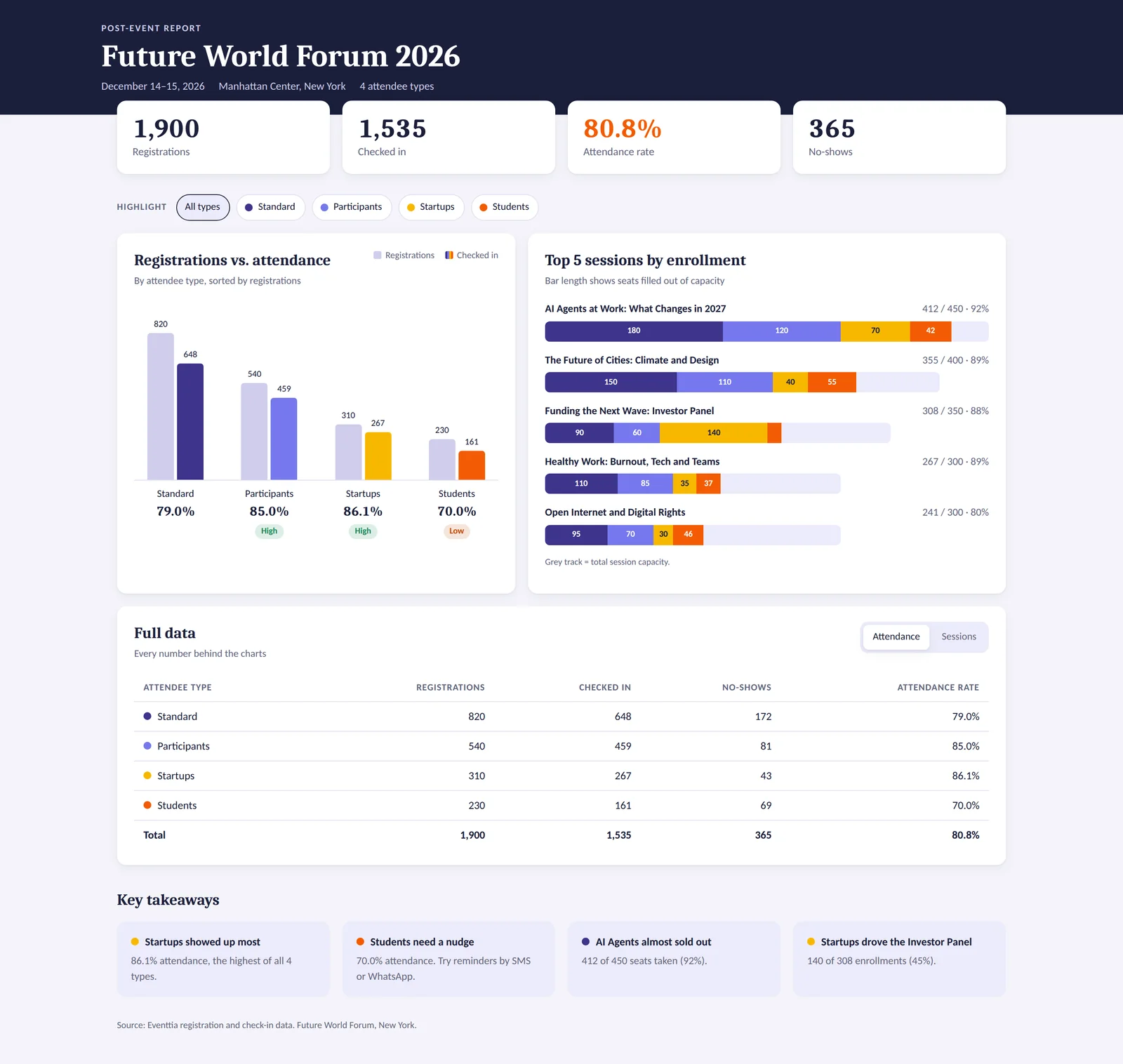
Dashboard built by ChatGPT from a demo event in Eventtia, through the MCP server (sample data).
To see it work from start to finish, watch our step-by-step demo with ChatGPT and live Eventtia data. You can do the same with Claude or Copilot.
Know the limits. Survey answers and NPS are not available through the MCP today, so add them from your survey export. Email campaigns and matchmaking meetings are not covered by the MCP yet. For lead and pipeline data, your assistant needs a connection to your CRM too.
How do you create a branded post-event report with AI?
Use the same connection. Ask your AI assistant to write the post-event report from your Eventtia data, with your logo, your brand colors and your targets. Then add your survey results and your budget, and check every number before you share the report.
Write a post-event report for [event name] using my Eventtia data. Compare each result with these targets: [targets]. Include registrations, attendance by attendee type, check-in timing and session attendance. End with 5 actions for the next edition. Use my brand colors [colors].
For the full method, with a prompt for each step and a complete example report, read our guide on how to write a post-event report.
Example: how did the Future World Forum measure success?
The Future World Forum is a fictional one-day conference for 1,000 people, built with sample data. It is the same event as in our post-event report guide. The team set 6 targets before the event, met 4 of them and missed 2, and the detailed KPIs showed exactly where to act next time.
About this example: Future World Forum is a fictional demonstration event. All numbers are sample data, created to show how KPIs work together.
| KPI | Target | Result | Status |
|---|---|---|---|
| Registrations | 900 | 860 | Missed (96% of target) |
| Attendance rate | 80% | 81.7% | Met |
| Satisfaction (1 to 5) | 4.0 | 4.3 | Met |
| NPS | +40 | +42 | Met |
| Sponsors signed | 6 | 6 | Met |
| Profit | $20,000 | $18,140 | Missed (91% of target) |
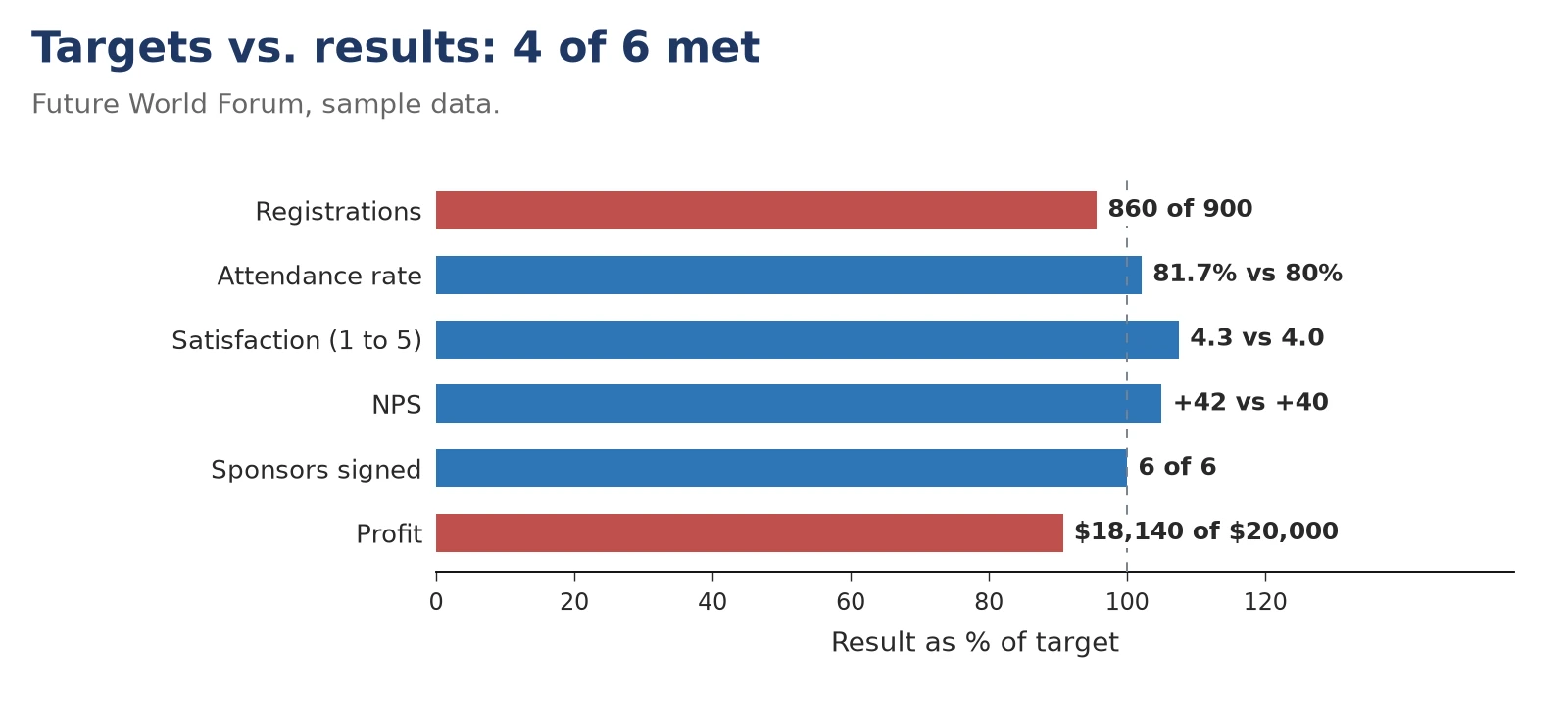
The headline results are only half the story. The detailed KPIs showed what to fix:
- Attendance by pass type: Standard pass holders checked in at 87.5% and Startups pass holders at 92.2%, but free Student passes only at 70.0%. Students made up 59% of all no-shows. Action: send students a reminder 48 hours before, with one-click cancellation.
- Check-in timing: 63% of attendees checked in between 12:00 and 12:30, and the check-in queue was the top complaint in the survey (58 mentions). Action: open the doors at 11:30 and add one check-in lane.
- Session attendance: 262 of the 300 attendees enrolled in the workshop attended (87.3%), but the workshop got the lowest session score (4.1). Action: run it twice for 150 people, with exercises.
- Sponsors: 4 of the 5 sponsors who answered the survey want to return, but traffic in the exhibition area dropped after 16:00. Action: cut the exhibition block from 2.5 to 1.5 hours.
- Finances: cost per attendee was $272 ($190,900 ÷ 703), and the $30,000 Gold sponsor alone was larger than the profit. Action: sign 1 or 2 more sponsors, or add a $5,000 tier.
To see how these results become a full report, read our post-event report guide. To turn the budget into an ROI figure, read our event ROI guide.
What mistakes should you avoid when measuring event success?
The most common mistakes are tracking numbers without targets, counting vanity metrics, mixing up definitions, counting scans as people and waiting until the event is over.
- No target: a number without a target cannot tell you if the event worked. Set targets before registrations open.
- Vanity metrics: app downloads or social impressions look good in a report but rarely prove a goal. Use them as context, not as KPIs.
- Mixed definitions: “registered,” “confirmed,” “checked in” and “paid” are four different numbers. Define each one once and use the same definition every edition.
- Scans instead of people: one person can be scanned several times. Count unique attendees for every rate.
- Measuring too late: if you only look at data after the event, you can only learn. If you look during the event, you can still act.
Event KPIs: summary
| KPI | What it tells you | When |
|---|---|---|
| 1. Registrations vs target | If your promotion is working | Before |
| 2. Attendance rate | How many registrants came | During, after |
| 3. Check-in timing | If you will have a queue | During |
| 4. Session attendance rate | Which content attracts people | During |
| 5. Satisfaction and NPS | How attendees felt and if they will recommend you | After |
| 6. Returning attendees | If your community is growing | After |
| 7. Revenue vs plan | Which income sources worked | Before, after |
| 8. Cost per attendee | How efficient your spending was | After |
| 9. Profit vs target | If the event paid for itself | After |
| 10. Registrations by channel | Which channel filled the event | Before |
| 11. Leads and SQLs | What business the event created | After |
| 12. Email performance | Which emails drove registrations | Before, after |
| 13. Sponsor satisfaction and renewal intent | If sponsors will come back | After |
| 14. Meetings held | If networking and matchmaking worked | During, after |
| 15. Booth traffic over time | If the exhibition area kept attendees | During |
Frequently asked questions about measuring event success
How do you measure event success?
Set a target for each event goal before registrations open. Then track 10 to 15 KPIs across registration and attendance, engagement, finances, marketing and sales, and sponsors, and compare each result with its target before, during and after the event.
What is the difference between event metrics and event KPIs?
An event metric is any number your platform records, such as registrations or page views. An event KPI is a metric you compare with a target to see if you reached a goal. You may have hundreds of metrics, but you only need 10 to 15 KPIs.
How many KPIs should you track for one event?
Track 10 to 15 KPIs per event, and choose 3 to 5 headline KPIs for your leadership. More KPIs make reports longer, not clearer.
What is a good attendance rate for an event?
There is no single benchmark, because the attendance rate depends on the price and the audience. Paid events usually keep more registrants than free ones. In our sample event, paid passes reached 87.5% and 92.2%, while free student passes reached 70.0%. Your best benchmark is your own previous edition.
When should you start measuring event success?
Start before registrations open, by setting targets. Track registrations every week before the event, follow check-ins and sessions live during the event, and close your report 2 to 4 weeks after the event, when survey answers and first sales results are in.
How do you measure the success of a free event?
Focus on attendance rate, satisfaction, NPS, returning attendees and leads. Free events often have more no-shows, so a reminder before the event matters. Cost per attendee still matters too, because a free ticket is not a free event.
Can AI build an event dashboard?
Yes. When your event platform is connected to an AI assistant through an MCP server, ChatGPT, Claude or Copilot can read your registrations, check-ins and sessions and build a dashboard in your brand colors. Check two or three numbers against your platform before you share it.
How do you present event results to leadership?
Use one page: your targets next to your results, 3 lessons and 3 actions for the next edition. Lead with the KPIs linked to business goals, then add the details. For a full structure, follow our post-event report guide.
Ready to see your event KPIs live?
Eventtia gives you live dashboards, reports, surveys and an MCP server that lets ChatGPT, Claude or Copilot work with your event data. Book a demo built around your own event, and see how your team can measure every edition with less work.
Eventtia is the platform behind the brands setting the standard.
Talk to us about how the platform fits into your stack: registration, communications, on-site and analytics, exposed deeply enough to compose.